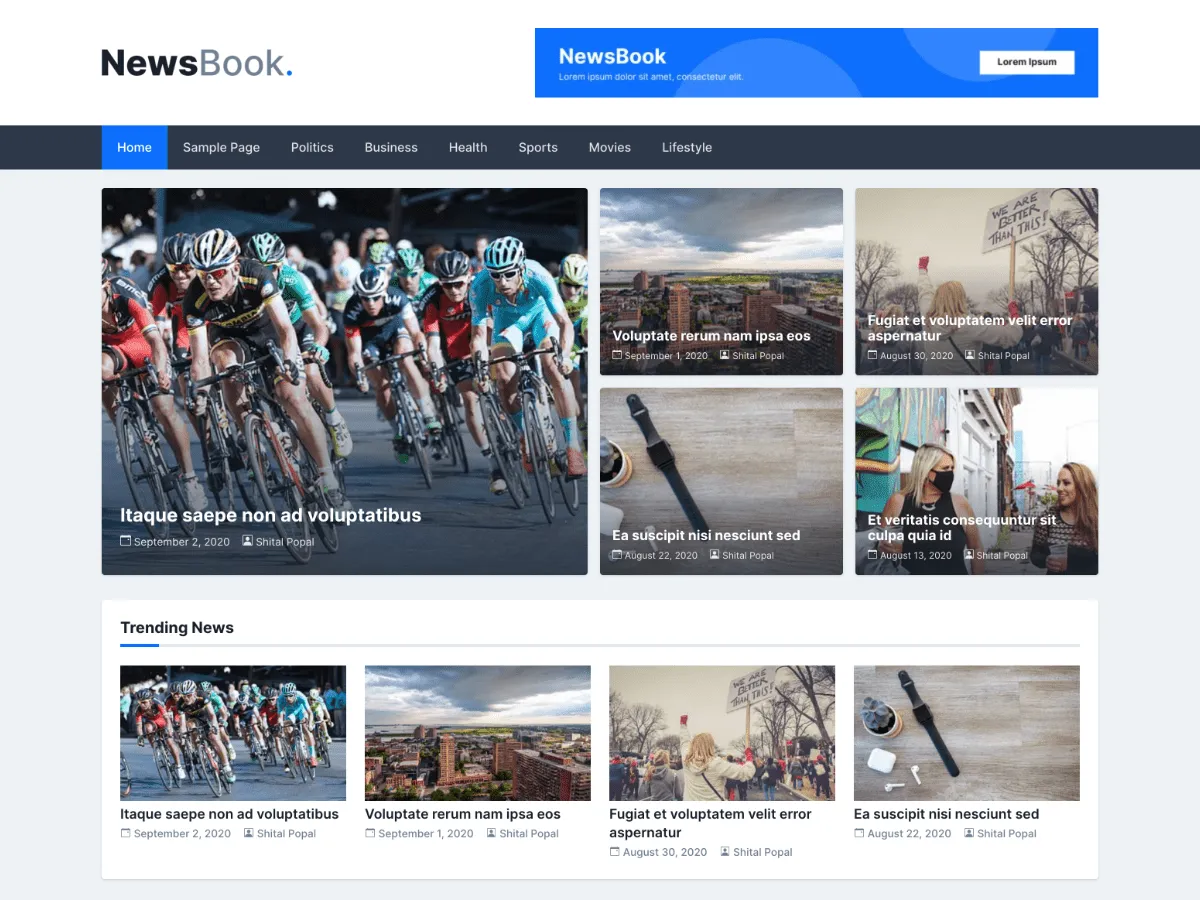
What NewsBook is for
NewsBook is a classic theme for news sites and blogs built on a simple two-column layout: content on the left, a widget sidebar on the right. Its front page opens with a banner grid — one large lead story and four smaller ones — drawn from a category you choose.
It is deliberately smaller than MagazineBook. There is no slider, no top bar and no ticker. The Customizer offers a wide or boxed layout, a primary colour, a logo height, the banner category, and a switch that hides the posts list on the front page so the banner and widgets can carry it alone.
Version 1.0.5, from 30 November 2020, is the current release on WordPress.org. WordPress.org reports 100+ active installations and no ratings yet.
Who it suits
Small news sites and blogs that want a lead-story banner, a right sidebar and only a handful of settings to look after.
NewsBook 內含什麼
- Front-page banner grid: one large lead story and four smaller ones from a category you choose
- Full-width “Front Page: Content Top Section” widget area directly below the banner
- Two-column layout with a right-hand sidebar on posts and listings
- Header Right widget area beside the logo, with a 728×90 advertisement widget
- Wide or boxed layout, a primary colour picker and an adjustable logo height
- Breadcrumbs when Yoast SEO is active
NewsBook at a glance
- Theme type
- Classic theme (set up in the Customizer)
- Current version
- 1.0.5
- Current version released
- 2020年11月30日
- Listed on WordPress.org since
- 2020年11月30日
- Requires WordPress
- 4.5
- Tested up to WordPress
- 5.5.3
- Requires PHP
- 5.6
- Active installs
- 100+
- Rating on WordPress.org
- No ratings yet
Version, dates, installs and ratings come from the WordPress.org theme directory; requirements come from the theme's readme. Checked on 2026年10月28日.
Good to know before you install
- Its readme lists WordPress 4.5 and PHP 5.6 as minimums and says it was tested up to WordPress 5.5.3. It is a classic theme without Site Editor support.
- The sidebar is always on the right; there is no setting to move or hide it.
- NewsBook does not display a header image. The theme declares header-image support, but no template prints it and the Customizer section is not shown.
- There are no footer widget areas, and the “Theme: newsbook” credit in the footer has no Customizer switch.
- The readme mentions WooCommerce, but the package contains no WooCommerce templates or styles. Test your shop pages before relying on it.
- The Inter font is requested from Google Fonts on every page view.
相關
你可能也會喜歡的其他佈景主題
常見問題
NewsBook 常見問題
Which version of NewsBook is current, and what does it need?
Version 1.0.5, released on WordPress.org on 30 November 2020. Its readme lists WordPress 4.5 and PHP 5.6 as minimums and says it was tested up to WordPress 5.5.3.
How do I choose the stories in the NewsBook banner?
Appearance → Customize → Frontpage Options → Banner Featured Posts → Featured Posts Category. The banner shows the five newest posts from that category: the first one large, the other four smaller. With no category it uses your latest posts. The banner can be turned off under Frontpage Options → General Options.
Can I move the NewsBook sidebar to the left?
Not through a setting. The templates place the sidebar in a right-hand column. Moving it means overriding index.php, single.php and the other templates in a child theme.
How do I put an advert in the NewsBook header?
Go to Appearance → Widgets and add the “NB: 728x90 Advertisement” widget to the Header Right area. It takes an image and a link. Any other widget can go there too.
Is NewsBook a block theme?
No. NewsBook is a classic theme: you write posts in the block editor as usual, but the layout is controlled from Appearance → Customize and Appearance → Widgets, not the Site Editor.