MagazineBookTema WordPress Magazine Gratis
Un tema magazine classico con slider, griglia di articoli in evidenza e cinque widget per gli articoli
What MagazineBook is for
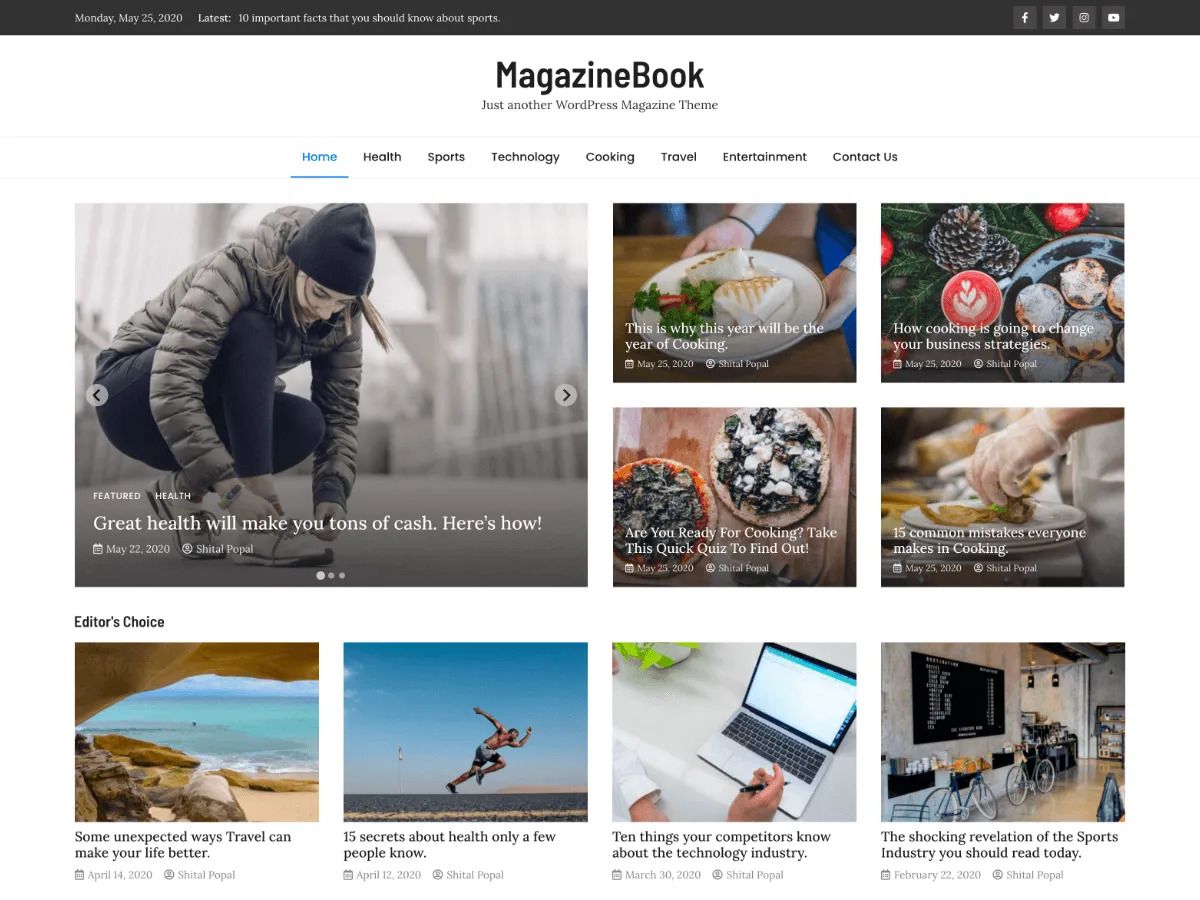
MagazineBook is a classic, PHP-template theme for magazine and news sites that publish across several categories. Its front page is assembled from three layers: a banner that pairs a slider with a featured-posts grid, widget areas that hold the theme's own post-list widgets, and the normal list of posts beside a sidebar.
Nearly every setting lives in Appearance → Customize, split into Header Options, Design Options, Content Options, Frontpage Options and Footer Options. Between them you can choose a header and footer design, switch the top bar, date, ticker and social links on or off, pick a wide or boxed layout, place the sidebar per template, flip the whole site to a dark skin and change fonts.
It is the most-installed Odie Themes theme. WordPress.org reports 800+ active installations and an average of 4.9 out of 5 from 17 ratings. Version 1.0.9 has been the current release since 11 July 2020.
Who it suits
Sites with several active categories that want a traditional magazine front page — slider, featured grid and category blocks — set up through the Customizer and widgets rather than the Site Editor.
Cosa c'è in MagazineBook
- Front-page banner: a five-post slider plus a four-post featured grid, each fed from a category you pick in the Customizer
- Header top bar with the date, a ticker of the five latest posts, and links to seven social networks
- Two header designs, two footer designs, an optional sticky menu and a header image or video
- Sidebar left, right or hidden — set separately for the front page, single posts, pages and archives
- Light or dark colour skin, a primary colour picker and four font combinations
- Five widgets (two featured-post layouts, a recent-posts list, a simple featured row, a 728×90 ad) and eight widget areas
MagazineBook at a glance
- Theme type
- Classic theme (set up in the Customizer)
- Current version
- 1.0.9
- Current version released
- 11 luglio 2020
- Listed on WordPress.org since
- 10 giugno 2020
- Requires WordPress
- 5.0
- Tested up to WordPress
- 5.4.1
- Requires PHP
- 7.1
- Active installs
- 800+
- Rating on WordPress.org
- 4.9/5 from 17 ratings on WordPress.org
Version, dates, installs and ratings come from the WordPress.org theme directory; requirements come from the theme's readme. Checked on 28 ottobre 2026.
Good to know before you install
- Its readme lists WordPress 5.0 and PHP 7.1 as minimums and says it was tested up to WordPress 5.4.1. It is a classic theme: there is no Site Editor support and no theme.json.
- Fonts are requested from Google Fonts (fonts.googleapis.com) on every page view. If your privacy policy has to account for third-party requests, plan for that.
- The “Theme: MagazineBook By OdieThemes” footer line is printed by the theme's footer functions. There is no Customizer switch for it; a child theme can replace it (see the FAQ below).
- There is no right-to-left (RTL) stylesheet in the package.
- After activation the dashboard shows a welcome notice and, later, a request to leave a review. Both carry a dismiss link.
- The package still advertises the discontinued MagazineBook Pro: the “MagazineBook Support” section in the Customizer has an “Upgrade to Pro” box, and the theme's dashboard page has a “MagazineBook Pro” column with demo links. Their “Learn More” links now lead to this page. There is nothing to buy; you can ignore them.
Prossimi passi
Strumenti gratis per configurare il tuo sito
Generatore di theme.json per WordPress
Crea un theme.json valido — e scopri quale metà cambia davvero il tuo sito.
Apri lo strumentoLaboratorio delle dimensioni immagine di WordPress
Trascina dentro un'immagine. Guarda ogni copia che WordPress ne farà.
Apri lo strumentoGeneratore di .htaccess per WordPress
Le regole di cui WordPress ha bisogno, più le regole di hardening che non include di serie
Apri lo strumentoCorrelati
Altri temi che potrebbero piacerti
FAQ
Domande su MagazineBook
Which version of MagazineBook is current, and what does it need?
Version 1.0.9, released on WordPress.org on 11 July 2020. Its readme lists WordPress 5.0 and PHP 7.1 as minimums and says it was tested up to WordPress 5.4.1.
How do I get the slider and the featured grid on the front page?
Go to Appearance → Customize → Frontpage Options → General Options and make sure “Check to show Banner Section on front page” is ticked (it is on by default). Then choose a category under Banner Slider and another under Banner Featured Posts. The slider shows the five newest posts from its category and the grid shows four. With no category chosen, both use your latest posts. The banner only appears on the first page of the front page.
Can I remove the “Theme: MagazineBook By OdieThemes” line from the footer?
Not from the Customizer — the line is printed by magazinebook_display_main_footer_design_1() and _design_2() in inc/footer-functions.php. Copy footer.php into a child theme and replace the call to those functions with your own markup. Removing the credit is allowed under the GPL and switches nothing off.
Does MagazineBook have a dark mode?
It has a dark skin rather than an automatic mode. Appearance → Customize → Design Options → Color Options → Base Color Skin switches the whole site between Light and Dark for every visitor; it does not follow the visitor's system setting.
What happened to MagazineBook PRO?
The PRO version is discontinued and old links to it now lead to this page. The free version on WordPress.org, described here, is the one to install.