MagazineCraftTheme WordPress tạp chí nhẹ
Theme tạp chí xây dựng bằng Tailwind với lưới bài viết và phông chữ phục vụ cục bộ
What MagazineCraft is for
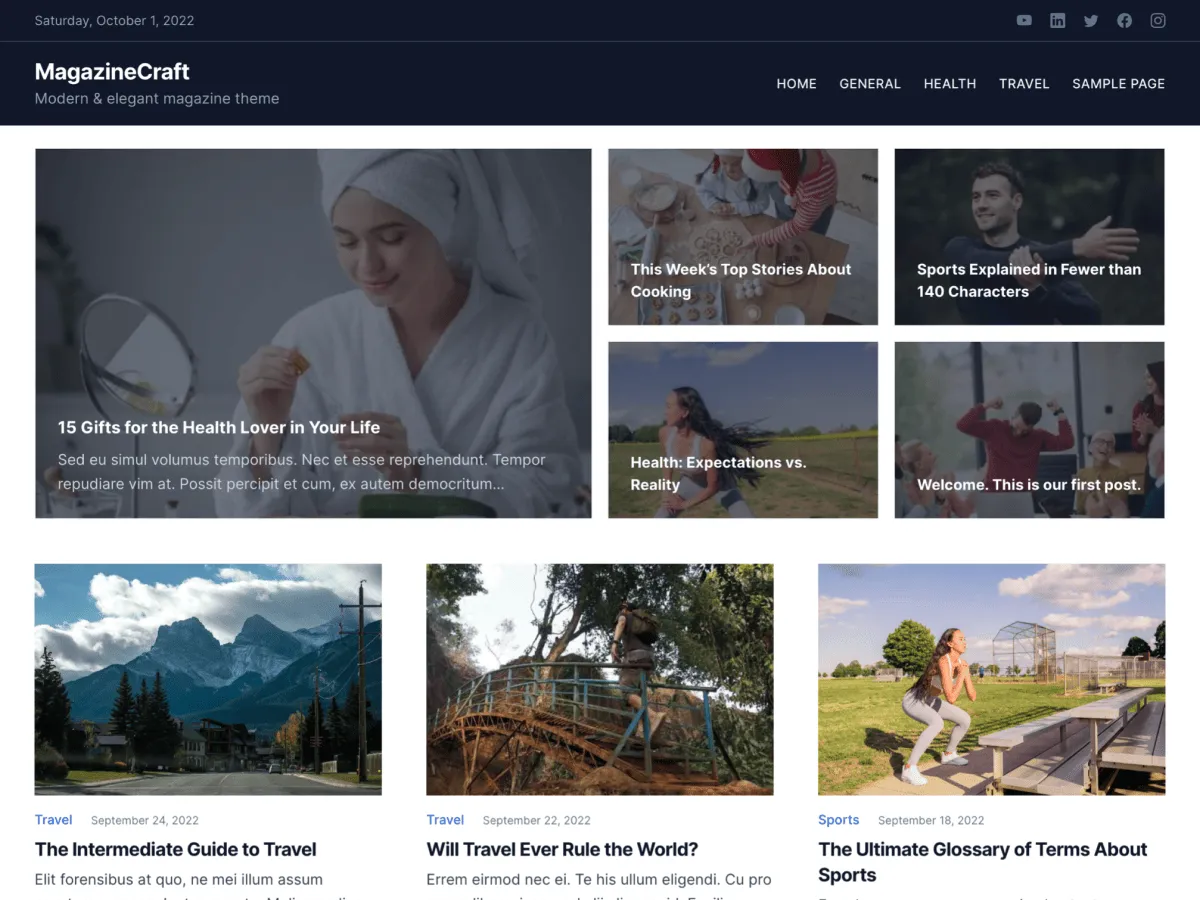
MagazineCraft is the newest of the five classic Odie Themes themes, first listed on WordPress.org in September 2022. It is styled with Tailwind CSS, and its listing pages show posts as cards in a responsive grid — three across on large screens, two on tablets and one on phones.
The front page opens with one of two banners. Type 1 is a cover: a background image with a title, description and button you write yourself, which suits a site that wants to introduce itself. Type 2, the default, pulls the five newest posts from a category you choose. Above the banner sit a top bar with the date and social links, and one of two header designs.
Its fonts are fetched once and then served from your own server through the WPTT webfont loader; the 1.0.1 changelog calls this “Load web fonts locally”. Version 1.0.2, from 1 October 2022, is the current release. WordPress.org reports 100+ active installations and no ratings yet.
Who it suits
Entertainment, lifestyle or general magazine sites that want an image-led grid of posts and a large opening banner, and owners who would rather not have every page view request fonts from Google.
Có gì trong MagazineCraft
- Three-column post grid on wide screens, two on tablets, one on phones
- Two front-page banners: a cover with your own title, text, button and background image, or five posts from a chosen category
- Header top bar with the date and links to six social networks, plus two header designs
- Fonts served from your own site (Inter by default, or Lora, Barlow Semi Condensed or Playfair Display)
- Wide or boxed layout, a primary colour picker and two footer designs
- WooCommerce support with product gallery zoom, lightbox and slider
MagazineCraft at a glance
- Theme type
- Classic theme (set up in the Customizer)
- Current version
- 1.0.2
- Current version released
- 1 tháng 10, 2022
- Listed on WordPress.org since
- 26 tháng 9, 2022
- Requires WordPress
- 5.6
- Tested up to WordPress
- 6.0
- Requires PHP
- 5.6
- Active installs
- 100+
- Rating on WordPress.org
- No ratings yet
Version, dates, installs and ratings come from the WordPress.org theme directory; requirements come from the theme's readme. Checked on 28 tháng 10, 2026.
Good to know before you install
- There is no sidebar column. The widget area called “Sidebar” is displayed as a full-width band of up to three columns below the content on posts, pages and archives.
- Its readme lists WordPress 5.6 and PHP 5.6 as minimums and says it was tested up to WordPress 6.0. It is a classic theme without Site Editor support.
- The “Theme: MagazineCraft” credit in the footer is printed by the theme's footer functions and has no Customizer switch; a child theme can replace it.
- After activation the dashboard shows a welcome notice that links to this documentation.
Bước tiếp theo
Công cụ miễn phí để thiết lập trang web của bạn
Trình tạo theme.json cho WordPress
Tạo tệp theme.json hợp lệ — và xem nửa nào thực sự thay đổi trang web của bạn.
Mở công cụPhòng thí nghiệm kích thước ảnh WordPress
Thả một ảnh vào. Xem mọi bản sao mà WordPress sẽ tạo ra từ nó.
Mở công cụTrình tạo .htaccess cho WordPress
Những quy tắc WordPress cần, cộng thêm các quy tắc tăng cường bảo mật mà nó không có sẵn
Mở công cụLiên quan
Các theme khác bạn có thể thích
Câu hỏi thường gặp
Câu hỏi về MagazineCraft
Which version of MagazineCraft is current, and what does it need?
Version 1.0.2, released on WordPress.org on 1 October 2022. Its readme lists WordPress 5.6 and PHP 5.6 as minimums and says it was tested up to WordPress 6.0.
How do I choose between the cover banner and the posts banner?
Appearance → Customize → Frontpage Options → Banner Options → Banner Design. Type 1 shows a cover with your own Banner Title Text, Banner Description Text, Banner Button Text, Banner Button Link and Banner Background Image. Type 2 (the default) shows five posts from the category set in Banner Posts Category, or your latest posts if none is set. “Check to show the banner section on frontpage” turns the banner off entirely.
Where do widgets appear in MagazineCraft?
The theme registers one widget area, Sidebar. Despite the name it is not a side column: it is printed as a full-width band below the main content, with the widgets arranged in up to three columns. It only appears once it has at least one widget.
Does MagazineCraft load fonts from Google?
Not on page views. It uses the WPTT webfont loader, which downloads the Google Fonts files once and serves them from your own site. You choose the font under Design Options → Font Options: Default (Inter), Option 1 (Lora), Option 2 (Barlow Semi Condensed) or Option 3 (Playfair Display).
What happened to MagazineCraft PRO?
The PRO version is discontinued and old links to it now lead to this page. The free version on WordPress.org, described here, is the one to install.