StoryBookÜcretsiz WordPress Blog Teması
Kart ızgarası ve yazı ayrıntıları üzerinde ince denetim sunan, Tailwind ile yapılmış bir blog teması
What StoryBook is for
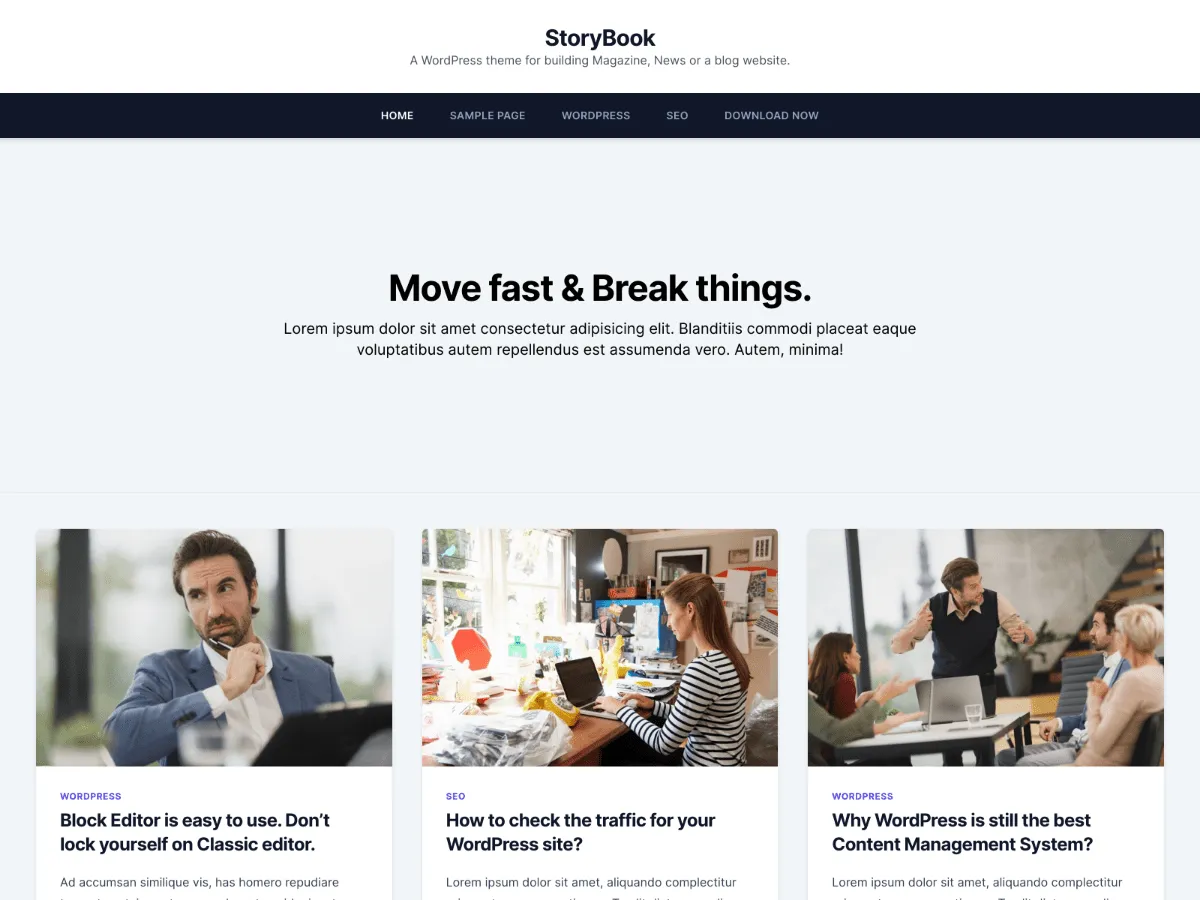
StoryBook is a classic blog theme styled with Tailwind CSS utility classes. The blog index and archives show posts as cards: two columns when the sidebar is shown, and up to three on large screens when it is hidden. Single posts and pages open without a sidebar by default, so the article uses the full content width.
Its Customizer is mostly about presentation. You can switch the navigation bar between white, light and dark, set a primary colour, choose one of five font options, add an intro section above the posts on the homepage, and hide individual pieces of post metadata — categories, excerpt, author, date, comments link, tags and the featured image on single posts — one checkbox at a time.
Version 1.0.4, from 22 May 2021, is the current release. WordPress.org reports 100+ active installations and one rating, 5 out of 5.
Who it suits
Personal and small-team blogs that want a modern card layout, control over which post details are shown, and an optional homepage intro, without building pages in the Site Editor.
StoryBook içinde neler var
- Card grid for the blog and archives: two columns beside a sidebar, up to three with the sidebar hidden
- No sidebar on single posts and pages by default; sidebar position set per page type
- Hide post categories, excerpt, author, date, comments link, tags or the featured image individually
- Optional homepage intro section with your own title and description
- White, light or dark navigation bar, a primary colour picker and five font options
- WooCommerce support with its own stylesheet, plus Jetpack infinite scroll
StoryBook at a glance
- Theme type
- Classic theme (set up in the Customizer)
- Current version
- 1.0.4
- Current version released
- 22 Mayıs 2021
- Listed on WordPress.org since
- 12 Mayıs 2021
- Requires WordPress
- 4.5
- Tested up to WordPress
- 5.7
- Requires PHP
- 5.6
- Active installs
- 100+
- Rating on WordPress.org
- 5.0/5 from 1 rating on WordPress.org
Version, dates, installs and ratings come from the WordPress.org theme directory; requirements come from the theme's readme. Checked on 28 Ekim 2026.
Good to know before you install
- Its readme lists WordPress 4.5 and PHP 5.6 as minimums and says it was tested up to WordPress 5.7. It is a classic theme without Site Editor support.
- The intro section ships with placeholder text (“Move fast & Break things.” and lorem ipsum). Replace both before you switch it on.
- All five font options are requested from Google Fonts on page views.
- The footer prints “Theme: storybook by OdieThemes”; there is no Customizer switch for it.
Sonraki adımlar
Sitenizi kurmak için ücretsiz araçlar
WordPress theme.json Oluşturucu
Geçerli bir theme.json oluşturun — ve hangi yarısının sitenizi gerçekten değiştirdiğini görün.
Aracı açWordPress Görsel Boyut Laboratuvarı
Bir görsel bırakın. WordPress'in ondan üreteceği her kopyayı görün.
Aracı açWordPress .htaccess Oluşturucu
WordPress'in ihtiyaç duyduğu kurallar ve varsayılan olarak gelmeyen güvenlik sıkılaştırma kuralları
Aracı açİlgili
Beğenebileceğiniz diğer temalar
SSS
StoryBook soruları
Which version of StoryBook is current, and what does it need?
Version 1.0.4, released on WordPress.org on 22 May 2021. Its readme lists WordPress 4.5 and PHP 5.6 as minimums and says it was tested up to WordPress 5.7.
How do I add an intro to the StoryBook homepage?
Appearance → Customize → Frontpage Settings → Intro Section. Tick “Show Intro Section on Frontpage” and fill in the title and description. It appears above the posts only when your homepage shows your latest posts (Settings → Reading).
How do I hide the author, date or tags on posts?
Appearance → Customize → Content Settings has separate checkboxes for post categories, excerpt, author, date, comments link, tags and the featured image on single posts. The same section can set a custom excerpt length (30 words by default once enabled).
Why is there no sidebar on my posts?
That is the default. Under Design Settings → Sidebar Positions, Single Post and Page are set to Hide Sidebar, while Frontpage and Archive default to Sidebar on Right. Each can be set to Right, Left or Hide.
Does StoryBook work with WooCommerce?
Yes. It declares WooCommerce support, ships its own woocommerce.css, and enables the product gallery zoom, lightbox and slider.