WordPress Default .htaccess File: Code and How to Restore It
The exact default .htaccess code WordPress writes for pretty permalinks, what each line does, and how to restore the file when posts 404 but the homepage works.

WordPress’s default .htaccess file is the short RewriteEngine block the software writes into your site’s root .htaccess so permalinks like /2026/10/post-name/ resolve instead of returning a 404. It looks like this:
# BEGIN WordPress
<IfModule mod_rewrite.c>
RewriteEngine On
RewriteRule .* - [E=HTTP_AUTHORIZATION:%{HTTP:Authorization}]
RewriteBase /
RewriteRule ^index\.php$ - [L]
RewriteCond %{REQUEST_FILENAME} !-f
RewriteCond %{REQUEST_FILENAME} !-d
RewriteRule . /index.php [L]
</IfModule>
# END WordPress
These rules come from the code WordPress uses to generate the block, and they match WordPress’s own .htaccess guide. WordPress also writes three comment lines right after # BEGIN WordPress, warning that edits between the markers will be overwritten. They don’t change how the rules work.
In a subfolder install, WordPress puts the subfolder’s path in both RewriteBase and the last rule, for example RewriteBase /blog/ and RewriteRule . /blog/index.php [L]. Multisite networks use a different block, and WordPress doesn’t write this file for them automatically.
TL;DR: This is the block between # BEGIN WordPress and # END WordPress in your site’s root .htaccess. If it’s missing or broken, the homepage still loads but every other permalink 404s. Opening Settings > Permalinks in wp-admin usually rewrites it for you on Apache or LiteSpeed; if WordPress can’t write the file, paste the block from this guide in by hand, above any rules you’ve added yourself, never between the markers.
Key takeaways
- WordPress generates this block on Apache and LiteSpeed when it has write access and pretty permalinks are on. Opening Settings > Permalinks is enough.
- If the file is missing or corrupted, permalinks return a 404 while the homepage still loads, because the homepage doesn’t need the rewrite rules.
- Put anything you or a plugin add above
# BEGIN WordPress, never inside the markers. WordPress replaces everything between them when it updates the file.
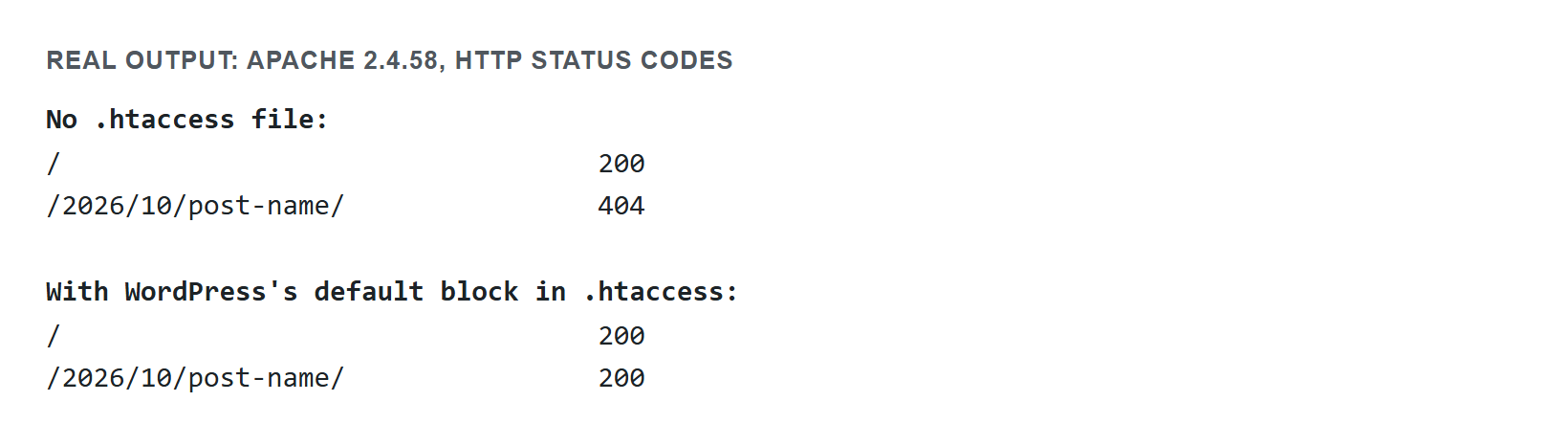
index.php stood in for WordPress.What each line actually does
RewriteEngine On turns on Apache’s mod_rewrite module for this directory; without it the rewrite rules below do nothing.
RewriteRule .* - [E=HTTP_AUTHORIZATION:%{HTTP:Authorization}] leaves the URL alone (that’s what the - means) and copies the request’s Authorization header into a server variable. WordPress reads that variable to pick up a username and password sent in the header, such as an Application Password.
RewriteBase / sets the path prefix Apache uses for rewritten URLs. WordPress sets it to wherever the site lives, so a subfolder install gets RewriteBase /blog/.
RewriteRule ^index\.php$ - [L] is a guard: if the request is already index.php, stop rewriting and let it through unchanged.
The two RewriteCond lines are the actual logic. %{REQUEST_FILENAME} !-f and !-d ask “does this request NOT match a real file, and NOT match a real directory?” Both have to be true for the final rule to fire, so an actual image, CSS file, or uploaded PDF is served directly and never touches WordPress’s routing.
RewriteRule . /index.php [L] is what makes permalinks work. Anything that passed those two conditions gets sent to index.php, and WordPress decides what post, page, or archive the URL means.
How Apache, LiteSpeed, and nginx each handle this rule
The default block is Apache syntax, but not every server reads it the same way. The table below is drawn from the official docs already cited in this guide (the WordPress nginx guide, the LiteSpeed Apache-compatibility notes, and Apache’s own mod_rewrite documentation), not from a new benchmark — there is no “faster” number to report here, only a real difference in where the rule lives and who can change it.
| Server | Where the rule lives | Who can edit it | What happens if it’s missing |
|---|---|---|---|
| Apache | .htaccess in the site root, read on every request unless cached | WordPress itself (if the folder is writable), or you by hand | Permalinks 404, homepage still loads |
| LiteSpeed | Same .htaccess file and syntax — LiteSpeed’s rewrite engine reads Apache’s directives directly | WordPress itself, same as Apache | Same 404 pattern as Apache |
| nginx | try_files (or an explicit location block) inside the server’s main config, not a per-directory file | Only a server admin with access to the nginx config and reload rights | Depends entirely on what the admin wrote; WordPress has no way to detect or fix it |
The practical takeaway: on Apache or LiteSpeed, a broken .htaccess is a file-permissions problem WordPress can usually repair itself. On nginx, it’s a server-configuration problem that only an administrator can touch — WordPress’s own nginx guide is explicit that it cannot write to that file at all.
When WordPress recreates this file, and when it won’t
WordPress flushes its rewrite rules every time the Settings > Permalinks screen loads, so opening it is enough and you don’t need to click Save Changes. If .htaccess is missing, WordPress creates it as long as the folder is writable and pretty permalinks are on. If the file exists and is writable, WordPress replaces the block between the markers.
That doesn’t fix the problem in these cases:
- The file or its folder isn’t writable by the user PHP runs as. The screen shows an error saying your
.htaccessfile isn’t writable, along with the rules to paste in. On some hosts PHP runs as a different system user than the one that owns your FTP uploads, so permissions that look fine in an FTP client can still block WordPress. - You’re on nginx. WordPress’s nginx guide says nginx has no directory-level configuration file like
.htaccess, and WordPress can’t change the server configuration. The equivalent routing is atry_filesdirective in the server configuration, which an administrator has to edit. AllowOverrideis set toNonefor your site’s directory in the main Apache config. Apache’s documentation says: “This means .htaccess files are completely ignored unless you explicitly enable them for a directory.” WordPress can write a perfect file and it still does nothing. Rewrite rules needAllowOverride FileInfo(orAll), which your host may have to change.- Your permalinks are set to Plain. Plain URLs don’t need rewrite rules, so WordPress doesn’t create the file for them.
Multisite’s different block
A single-site install never needs anything more than the block at the top of this guide. A Multisite network uses a longer one, because every request has to be checked against a network path (a subfolder or a subdomain) before it falls through to index.php. WordPress’s own .htaccess reference publishes this exact block for a subfolder (path-based) network:
# BEGIN WordPress Multisite
# Using subfolder network type: https://wordpress.org/documentation/article/htaccess/#multisite
RewriteEngine On
RewriteRule .* - [E=HTTP_AUTHORIZATION:%{HTTP:Authorization}]
RewriteBase /
RewriteRule ^index\.php$ - [L]

# add a trailing slash to /wp-admin
RewriteRule ^([_0-9a-zA-Z-]+/)?wp-admin$ $1wp-admin/ [R=301,L]

RewriteCond %{REQUEST_FILENAME} -f [OR]
RewriteCond %{REQUEST_FILENAME} -d
RewriteRule ^ - [L]
RewriteRule ^([_0-9a-zA-Z-]+/)?(wp-(content|admin|includes).*) $2 [L]
RewriteRule ^([_0-9a-zA-Z-]+/)?(.*\.php)$ $2 [L]
RewriteRule . index.php [L]
# END WordPress Multisite
The extra wp-admin trailing-slash rule and the two rules that strip a site’s subfolder prefix off wp-content, wp-admin, wp-includes, and any .php request are what the single-site block doesn’t need: on Multisite, /site-two/wp-content/themes/... has to resolve to the real wp-content folder at the root, not a site-two folder that doesn’t exist. A subdomain network (site2.example.com instead of example.com/site-two/) uses the same logic without the subfolder capture group, since the subdomain itself does that job. Either way, WordPress doesn’t generate this file automatically on network activation the way it does for a single site — it has to be created by hand from the reference above.
How to restore it by hand
If posts and pages 404 while the homepage still works, a missing or broken .htaccess is the first thing to check. Fix it in two steps.
1. Try the one-click fix first. Open Settings > Permalinks in wp-admin, then click Save Changes without changing anything. If WordPress can write the file, this regenerates it. If it can’t, the screen shows the error and the rules you need.
2. If that doesn’t fix it, create the file by hand. Connect over FTP/SFTP or your host’s file manager and go to your site’s root folder, which is normally the one containing wp-admin. Check whether .htaccess exists. It’s a dotfile, so some file managers hide it by default; turn on “show hidden files.”
- If it’s missing, create a new file named exactly
.htaccess(no.txt, nothing before the dot). - Paste in the rules WordPress showed you, or the default block from the top of this guide. In a subfolder install, change
RewriteBaseand the last rule to match. - Save, then reload a post permalink to confirm it works.
If it still 404s, .htaccess may be getting ignored. Check AllowOverride with your host, since Apache ignores a correct file when it’s turned off.
Your own rules vs. WordPress’s block
A plugin or a manual edit might add rules of its own, such as redirects, hotlink protection, or caching headers. Keep those outside WordPress’s block, and above it so they run before its catch-all rule:
# Rules you or a plugin added: ABOVE the WordPress markers
<FilesMatch "\.(jpg|jpeg|png|gif)$">
    # example: hotlink protection, caching rules, etc.
</FilesMatch>

# BEGIN WordPress
<IfModule mod_rewrite.c>
RewriteEngine On
RewriteRule .* - [E=HTTP_AUTHORIZATION:%{HTTP:Authorization}]
RewriteBase /
RewriteRule ^index\.php$ - [L]
RewriteCond %{REQUEST_FILENAME} !-f
RewriteCond %{REQUEST_FILENAME} !-d
RewriteRule . /index.php [L]
</IfModule>
# END WordPress
Anything placed between # BEGIN WordPress and # END WordPress is lost the next time WordPress updates the file, and loading the Permalinks screen is enough to trigger that. Lines before and after the markers are kept. For redirects specifically, see WordPress .htaccess redirect rules done right for where they belong and how to avoid loops.
A 500 Internal Server Error right after editing the file points to what you just changed. Apache’s documentation says the error log will likely name a directive that isn’t permitted or a syntax error. Rules copied from an old tutorial can do this: Order is an invalid command on Apache 2.4 unless mod_access_compat is loaded. Undo the edit to bring the site back, then read the error log.
Beyond the default block
The default block only handles permalink routing and the Authorization header. To tighten up access to sensitive files, such as blocking PHP execution in /uploads or denying direct requests to wp-config.php, see WordPress .htaccess security rules that actually help. If permalinks are returning a 404 for another reason, such as a wrong permalink structure, a caching layer serving stale rules, or a multisite subdirectory conflict, WordPress permalinks not working walks through the other causes. If you added an HTTPS-redirect rule to this same file after moving to SSL, see WordPress mixed content after moving to HTTPS for why browsers can still flag the page as insecure even once the redirect works.
For the full editable block with any security or redirect rules mixed in, generate it with the free WordPress .htaccess generator rather than copying rules from several guides by hand.
FAQ
What is the default WordPress .htaccess file?
It is the RewriteEngine block WordPress writes between # BEGIN WordPress and # END WordPress in your site’s root .htaccess file. It passes the Authorization header to PHP and sends any request that isn’t a real file or folder to index.php.
What is WordPress’s exact default .htaccess code?
RewriteEngine On, a rule that passes the Authorization header to PHP, RewriteBase /, a pass-through rule for index.php, two conditions checking that the request isn’t a real file or folder, and a final rule sending everything else to index.php. The full block is at the top of this guide.
Why do all my posts 404 except the homepage?
A missing or corrupted .htaccess file on Apache produces this pattern. The server can find the homepage without rewrite rules. Every other permalink needs those rules to reach index.php, so without them Apache looks for a file that doesn’t exist and returns a 404.
Does WordPress recreate .htaccess automatically?
Yes, on Apache or LiteSpeed with mod_rewrite, if pretty permalinks are on and WordPress can write there. Opening Settings > Permalinks is enough to trigger it. A missing file needs a writable folder, and an existing file must be writable. Otherwise the screen shows an error, along with the rules to paste in by hand.
Why doesn’t nginx have a WordPress .htaccess file?
nginx has no directory-level configuration file like Apache’s .htaccess. The same routing is written as a try_files rule in the nginx server configuration, which an administrator has to edit because WordPress can’t change it.
Why did my .htaccess break after I saved permalinks?
Check whether a custom rule was placed inside the # BEGIN WordPress and # END WordPress markers. WordPress replaces everything between them when it updates the file, so that rule is lost. Keep custom rules above the markers.
Sources
- WordPress Advanced Administration: .htaccess
- WordPress Advanced Administration: Nginx
- WordPress source code: class-wp-rewrite.php, options-permalink.php, misc.php, load.php, user.php, vars.php
- Apache HTTP Server 2.4: .htaccess files, mod_rewrite, Upgrading to 2.4
Rebuild a clean, correct .htaccess, with the default permalink block plus any security or redirect rules you actually need, using the free WordPress .htaccess generator.
William Lopez is the founder of Odie Themes. He builds the free WordPress tools and themes on this site and has been on WordPress.org since December 2019.
FAQ
Questions
What is the default WordPress .htaccess file?
It is the RewriteEngine block WordPress writes between # BEGIN WordPress and # END WordPress in your site's root .htaccess file. It passes the Authorization header to PHP and sends any request that isn't a real file or folder to index.php.
What is WordPress's exact default .htaccess code?
RewriteEngine On, a rule that passes the Authorization header to PHP, RewriteBase /, a pass-through rule for index.php, two conditions checking that the request isn't a real file or folder, and a final rule sending everything else to index.php. The full block is at the top of this guide.
Why do all my posts 404 except the homepage?
A missing or corrupted .htaccess file on Apache produces this pattern. The server can find the homepage without rewrite rules. Every other permalink needs those rules to reach index.php, so without them Apache looks for a file that doesn't exist and returns a 404.
Does WordPress recreate .htaccess automatically?
Yes, on Apache or LiteSpeed with mod_rewrite, if pretty permalinks are on and WordPress can write there. Opening Settings > Permalinks is enough to trigger it. A missing file needs a writable folder, and an existing file must be writable. Otherwise the screen shows an error, along with the rules to paste in by hand.
Why doesn't nginx have a WordPress .htaccess file?
nginx has no directory-level configuration file like Apache's .htaccess. The same routing is written as a try_files rule in the nginx server configuration, which an administrator has to edit because WordPress can't change it.
Why did my .htaccess break after I saved permalinks?
Check whether a custom rule was placed inside the # BEGIN WordPress and # END WordPress markers. WordPress replaces everything between them when it updates the file, so that rule is lost. Keep custom rules above the markers.