WordPress .htaccess Redirect Rules: 301s Done Right
Move a URL without losing rankings: which WordPress .htaccess redirect directive to use, where the rules must sit, and how to test without lockout.

Moving a URL and want the old one to keep its rankings? You need a 301 in .htaccess, placed where WordPress will not erase it, written with the right directive, and pointed at the exact URL WordPress actually serves. Get any of those three wrong and you get a redirect chain, a loop, or a 500 that locks you out of wp-admin.
The decision, the placement rule, and the test, in that order.
TL;DR: Use Redirect for one known path, RedirectMatch when one regex covers a whole section, and RewriteRule only when the redirect depends on a condition (hostname, protocol, query string) — mod_alias can’t test those. Put custom rules above # BEGIN WordPress, never inside it. Test with curl -sI, not a browser, and start with a 302 until the destination is confirmed.
Which directive: Redirect, RedirectMatch, or RewriteRule
There are two Apache modules in play and they are not interchangeable.
| Directive | Module | Best for | Syntax | Tests a condition? |
|---|---|---|---|---|
Redirect | mod_alias | One known old path → one new path | Redirect 301 /old-page/ https://example.com/new-page/ | No |
RedirectMatch | mod_alias | A whole section moving under one pattern | RedirectMatch 301 ^/blog/(.*)$ https://example.com/articles/$1 | No |
RewriteRule | mod_rewrite | Hostname, protocol, query string, user agent | RewriteCond %{HTTP_HOST} ^example\.com$ [NC]RewriteRule ^(.*)$ https://www.example.com/$1 [R=301,L] | Yes |
Decision flow, in short: does the redirect depend on anything other than the URL path itself — host, protocol, a query parameter, a header? If yes, that’s a condition, and only RewriteRule can test it. If no, stay in mod_alias: one path is Redirect, a whole pattern of paths is RedirectMatch.
Redirect or RedirectMatchRewriteRule with RewriteCondRedirect (mod_alias) — one known path to one destination. Simplest thing that works:
Redirect 301 /old-page/ https://example.com/new-page/Two behaviours to know. It matches on a path prefix, not an exact string, so /old-page/ also catches /old-page/anything/ and appends /anything/ to the destination. And it carries the query string across automatically.
RedirectMatch (mod_alias) — one regex covering many URLs. This is how you move a whole section:
RedirectMatch 301 ^/blog/(.*)$ https://example.com/articles/$1The capture group (.*) becomes $1 in the destination, so /blog/hello-world/ lands on /articles/hello-world/. Note the leading slash: mod_alias patterns match the full URL path.
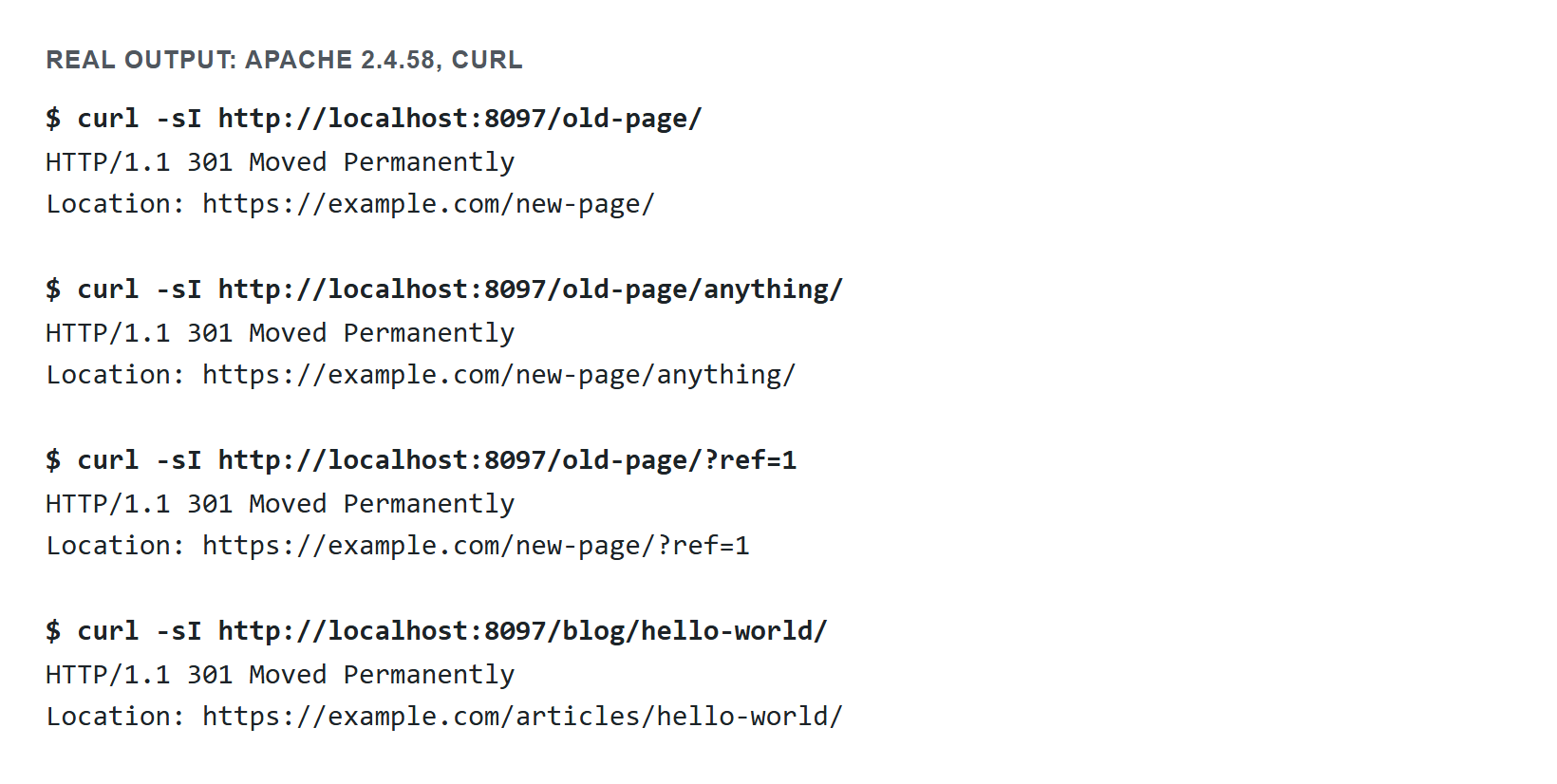
.htaccess, typeset for readability rather than a raw terminal capture. The Redirect line kept the extra path and the query string, and RedirectMatch filled in the captured part of the URL — behaviour you can reproduce yourself with curl -sI against any server running these two lines.RewriteRule (mod_rewrite) — required when the redirect depends on a condition: the hostname, the protocol, a query string, a user agent. Nothing in mod_alias can test those.
RewriteEngine On
RewriteCond %{HTTP_HOST} ^example\.com$ [NC]
RewriteRule ^(.*)$ https://www.example.com/$1 [R=301,L]
The pattern in a per-directory .htaccess has the leading slash stripped — that is why it is ^(.*)$ here and ^/blog/ in the mod_alias example. Mixing that up is the single most common reason a pasted rule silently does nothing.
Default to mod_alias. Reach for RewriteRule only when you need a condition. Fewer regexes, fewer ways to be wrong.
Where the rules must go
Custom redirects belong above the # BEGIN WordPress line. Not inside it.
# --- custom redirects ---
Redirect 301 /old-page/ https://example.com/new-page/
RedirectMatch 301 ^/blog/(.*)$ https://example.com/articles/$1

# BEGIN WordPress
# The directives (lines) between "BEGIN WordPress" and "END WordPress" are
# dynamically generated, and should only be modified via WordPress filters.
<IfModule mod_rewrite.c>
RewriteEngine On
RewriteRule .* - [E=HTTP_AUTHORIZATION:%{HTTP:Authorization}]
RewriteBase /
RewriteRule ^index\.php$ - [L]
RewriteCond %{REQUEST_FILENAME} !-f
RewriteCond %{REQUEST_FILENAME} !-d
RewriteRule . /index.php [L]
</IfModule>
# END WordPress
Two independent reasons:
- WordPress rewrites its own block. Saving Settings → Permalinks calls
flush_rewrite_rules(), which discards everything between the markers and regenerates it. A rule you put inside disappears the next time anyone touches that screen — possibly months later, with nobody connecting the two events. - Order decides who wins. The WordPress block ends with a catch-all sending every non-file, non-directory request to
index.php. ARewriteRuleplaced after it never runs.
If the whole WordPress block above your redirects has gone missing — posts 404 but the homepage still loads — see restoring WordPress’s default .htaccess file before you add any more rules on top of it. If posts are 404ing for a different reason (the WordPress block is still there, re-saving permalinks doesn’t fix it), that’s a separate problem covered in WordPress posts returning 404 but the homepage works.
One honest complication: mod_alias and mod_rewrite do not actually run in file order. Apache processes mod_alias during URL translation and per-directory mod_rewrite later, during fixup — so a Redirect line can win over a RewriteRule that appears above it in the file. If you find yourself needing both on overlapping paths, pick one module for that path and stay inside it. Debugging a mod_alias-versus-mod_rewrite fight is not worth the hour.
Trailing slashes
WordPress’s own canonical redirect adds a trailing slash to most permalinks. So this:
Redirect 301 /old-page/ https://example.com/new-pageproduces two hops — your 301 to the slashless URL, then WordPress’s own 301 adding the slash. Chains still pass ranking signals, but they waste crawl budget and add a round trip for every visitor.
Load the destination in a browser first, copy the URL exactly as it settles in the address bar, and use that. If your permalink structure ends in .html or has no trailing slash, match that instead. There is no universally correct answer here, only “match what WordPress serves.”
Testing without locking yourself out
.htaccess is read on every request. A syntax error returns a 500 for the entire site including wp-admin, so the recovery path has to exist before you need it.
Back up the file first. Over SSH:
cp /path/to/wordpress/.htaccess /path/to/wordpress/.htaccess.bakIf the site 500s, rename the broken file back over the top and the site returns immediately. Keep an SFTP session already open in another window — logging in from scratch while the site is down is where the panic starts. Note that apachectl configtest does not parse .htaccess, so it will report a healthy config while your site is dead.
Test with curl, not a browser. Browsers cache 301 responses hard and will happily show you yesterday’s result:
curl -sI https://example.com/old-page/ | head -n 5Read two things: the status line should say 301, and the Location: header should be the exact final URL. To see the whole chain, follow it:
curl -sIL https://example.com/old-page/ | grep -E '^(HTTP|Location)'More than one HTTP/1.1 301 line means you built a chain. More than about five means you built a loop, and curl will stop and tell you so.
Use 302 while you are still unsure. A 302 is not cached the same way, so a mistake is reversible in seconds. Switch to 301 once curl shows the destination you intended. This costs nothing and has saved more sites than any other habit in this article.
If a rule seems to do nothing at all, confirm Apache is even reading the file. AllowOverride None on the directory makes Apache ignore .htaccess entirely, and nginx ignores it completely — check the Server: header with curl -I before debugging regexes. To assemble the block with the right syntax for your Apache version and install path, use the WordPress .htaccess generator.
When not to use .htaccess at all
For a handful of redirects that editors need to manage themselves, a redirect plugin storing rules in the database is the better tool — it survives host migrations and does not require SSH. The tradeoff is real: PHP has to boot to serve the redirect, which is slower than Apache answering directly.
Use .htaccess for structural, permanent moves — a domain change, a section rename, forcing HTTPS or www. Use a plugin for one-off editorial redirects. Doing both is fine as long as you know which layer owns which URL, because a redirect defined in two places is a bug waiting for a bad afternoon.
The same file that holds your redirects is also where the useful security rules live — see WordPress .htaccess security rules that actually help for the handful worth adding. And if the move you’re making is HTTP to HTTPS specifically, pair the redirect with a database check: forcing the protocol in .htaccess doesn’t fix hardcoded http:// URLs already stored in posts and widgets, which is what WordPress mixed content after moving to HTTPS walks through.
Sources
- Apache HTTP Server 2.4: mod_alias (Redirect, RedirectMatch), mod_rewrite (RewriteRule), Redirecting and remapping with mod_rewrite, .htaccess files
- WordPress Advanced Administration: .htaccess
- WordPress Developer Resources: flush_rewrite_rules()
William Lopez is the founder of Odie Themes. He builds the free WordPress tools and themes on this site and has been on WordPress.org since December 2019.
FAQ
Questions
Where do custom redirects go in the WordPress .htaccess file?
Above the # BEGIN WordPress line, never between the markers. WordPress regenerates everything inside those markers whenever anyone saves the Permalinks screen, so a rule placed inside is deleted without warning. Placement also matters for order: the WordPress block ends in a catch-all that sends unmatched requests to index.php.
Should I use Redirect, RedirectMatch or RewriteRule for a 301?
Use Redirect for a single known path, RedirectMatch when one pattern covers many URLs, and RewriteRule when the redirect depends on a condition such as hostname, protocol or query string. Redirect and RedirectMatch come from mod_alias and are simpler. RewriteRule comes from mod_rewrite and is the only one that can test conditions.
Why does my .htaccess redirect cause a redirect loop?
Usually the destination still matches the rule that sent the visitor there, so the rule fires again forever. The other common cause is forcing HTTPS behind a load balancer or CDN, where the server sees plain HTTP on every request even though the visitor is already on HTTPS. Test the X-Forwarded-Proto header instead.
Does a trailing slash matter in a WordPress redirect?
Yes. WordPress canonical redirection adds a trailing slash to most permalinks, so pointing a 301 at a slashless URL produces two hops instead of one. Chained redirects still pass ranking signals but waste crawl budget and slow the visitor. Match the exact final URL that WordPress serves, including the slash.
How do I test an .htaccess redirect without breaking my site?
Run curl with the head-only flag against the old URL and read the status code and Location header before trusting a browser. Browsers cache 301 responses aggressively and will show you a stale result. Keep a copy of the working file first, since a syntax error in .htaccess returns a 500 on every page including wp-admin.
Why did my whole site return a 500 error after adding a redirect?
A single malformed directive in .htaccess takes down every URL under that directory, admin included. Common causes are an unclosed IfModule wrapper, a missing RewriteEngine On line, or Apache 2.2 and 2.4 access syntax mixed in one file. Remove the last block you added and reload to confirm.