WordPress .htaccess Security Rules That Actually Help
Three .htaccess rules genuinely shrink your WordPress attack surface: block PHP in uploads, deny wp-config.php, disable directory indexing. Skip the rest.

TL;DR: Three .htaccess rules genuinely reduce WordPress’s attack surface — block PHP execution in wp-content/uploads, deny direct access to wp-config.php, and turn off directory indexing. Everything else sold as “hardening” (blocking xmlrpc.php for brute force, hiding your version, bad-bot blocklists, IP-locking) is marginal or outright theatre. The table below shows which is which; the before/after table further down shows the real HTTP status codes from a test server with and without the three rules applied.
Most of what gets sold as “WordPress .htaccess security” is padding. The rules that actually change your attack surface are short: block PHP execution inside wp-content/uploads, deny direct access to wp-config.php, and disable directory indexing. The popular ones — blocking xmlrpc.php “to stop brute force,” hiding your WordPress version, pasting a 200-line bad-bot user-agent list — range from marginal to pure theatre. Below is which is which, and why.
| Rule | Effort | Real risk reduced |
|---|---|---|
Deny PHP execution in /uploads | One-time, paste once | High — stops an uploaded web shell from ever executing |
Deny wp-config.php | One-time, paste once | Low-probability but severe — guards the failure case where PHP stops running and the file gets served as plaintext |
| Disable directory indexing | One-time, paste once | Low but real — stops stray backups and SQL dumps from being listed |
Block xmlrpc.php “for brute force” | One-time | None against brute force; only shrinks the unrelated pingback-DDoS surface |
| Hide WordPress version / generator tag | A few minutes | ~None — fingerprinted anyway via asset query strings and block-editor markup |
| Giant bad-bot user-agent blocklist | Ongoing upkeep, stale immediately | ~None, plus a real performance cost (Apache evaluates every regex on every request) |
IP-lock wp-login.php | Ongoing upkeep | Conditional — breaks the moment your ISP rotates your IP |
Author-enumeration redirect (?author=1) | A few minutes | Incomplete — the /wp-json/wp/v2/users REST endpoint still leaks usernames |
Use the WordPress .htaccess generator to assemble the three rows that matter in the correct Apache dialect for your server, and see WordPress .htaccess redirect rules if what you actually need is 301s, not hardening.
One thing to settle first: .htaccess only does anything on Apache (and LiteSpeed, which reads it too). On nginx it is ignored entirely — the file just sits there while you believe you’re protected. If your host runs nginx, none of this applies and you need server/location blocks instead. Check with curl -I https://yoursite.com and look at the Server: header before you spend an hour editing a file the server never reads.
One more scope note: this guide is only about shrinking attack surface. If you’re in .htaccess because you just moved to HTTPS and the browser is throwing mixed-content warnings, that’s a different job — see clearing WordPress mixed content after moving to HTTPS for the force-HTTPS rewrite rule and the database cleanup it doesn’t do on its own.
The rule that actually matters: no PHP in /uploads
This is the one worth doing. wp-content/uploads is world-writable by design — every media upload, every plugin that saves a file, writes there. If an attacker gets a .php file into that directory (through a vulnerable upload handler, an image field that doesn’t validate MIME type, a compromised plugin), the difference between an annoyance and a full remote-code-execution compromise is whether the server will execute that file when requested. Deny execution and the uploaded payload is just an inert file sitting on disk.
Drop this into wp-content/uploads/.htaccess (create the file if it doesn’t exist):
<FilesMatch "\.php$">
    Require all denied
</FilesMatch>
That is Apache 2.4 syntax. On the older 2.2, the equivalent is Order Deny,Allow / Deny from all. Mixing the two dialects in one file is the most common cause of a sudden 500 Internal Server Error after “hardening” — if the whole site dies the moment you save, that’s almost always the reason. Check your version with apachectl -v.
| Apache version | Deny-all syntax | Mixing it with the other dialect |
|---|---|---|
| 2.4 (current) | Require all denied | Causes a 500 the moment you save |
| 2.2 (older, some legacy hosts) | Order Deny,Allow then Deny from all | Causes a 500 the moment you save |
Protect wp-config.php
wp-config.php holds your database credentials and auth salts. While PHP is running, a direct request to it returns a blank page — PHP executes the file instead of printing it. The risk is the failure case: if PHP ever crashes, gets misconfigured during a migration, or the handler is disabled, Apache serves the file as plaintext and dumps your DB password to anyone who asks. Denying access is cheap insurance against a bad five minutes:
<Files wp-config.php>
    Require all denied
</Files>
Turn off directory indexing
If someone visits a folder with no index.php and Apache has Options +Indexes on, it lists the contents — every backup file, every stray SQL dump you forgot about. Turn it off site-wide:
Options -IndexesLow severity, but real, and it costs nothing.
That’s the honest core list. You can assemble these — plus the correct 2.4-vs-2.2 syntax so you don’t 500 your site — with the WordPress .htaccess generator rather than copy-pasting from a forum post written for the wrong Apache version.
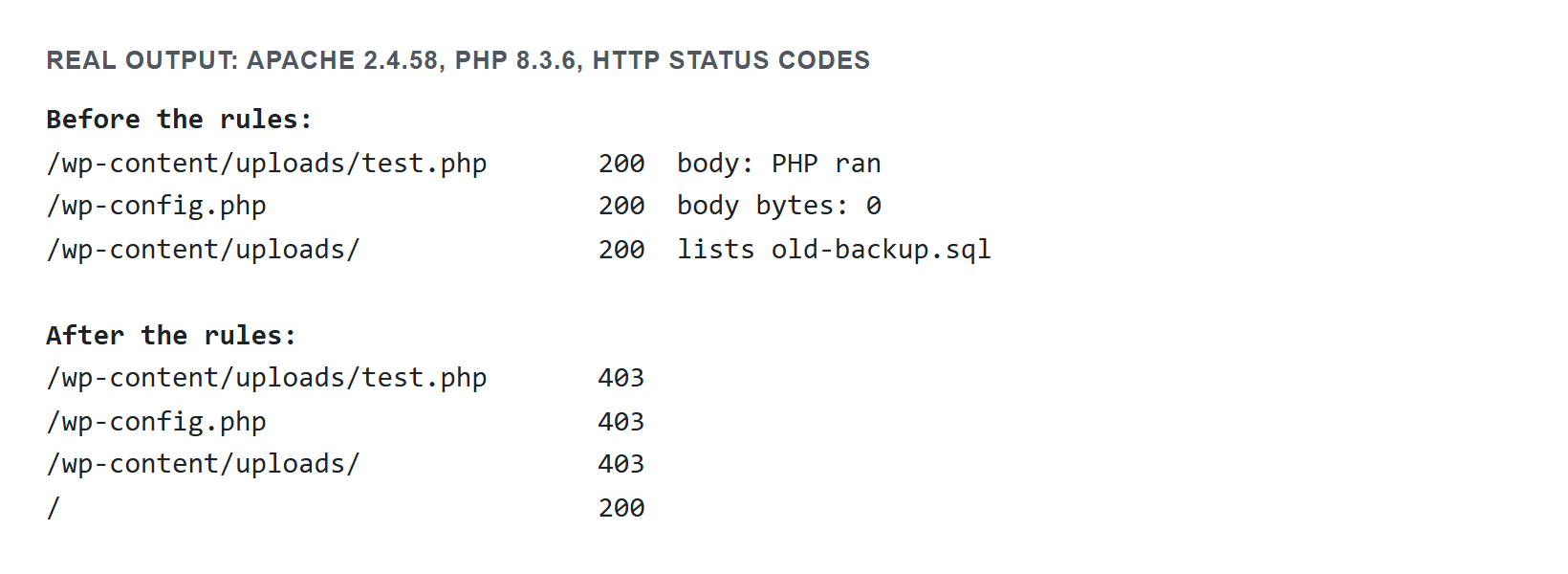
The same result as a table, for anyone who can’t read the screenshot above (screen readers, AI crawlers, and anyone skimming):
| Request | Before the 3 rules | After the 3 rules |
|---|---|---|
GET /wp-content/uploads/test.php | 200 — the PHP file executes | 403 Forbidden |
GET /wp-content/uploads/ (directory listing) | 200 — files in the folder are listed | 403 Forbidden |
GET /wp-config.php | Not part of this before/after pair — the risk shows up only when PHP stops running (see above), not under normal operation | 403 Forbidden |
GET / (homepage) | 200 | 200 — unaffected |
Same test server, same methodology note: Apache 2.4.58, PHP 8.3.6, hand-made test files, no full WordPress install.
What NOT to do
Blocking xmlrpc.php “for brute-force protection.” This is the big one everybody repeats and it’s wrong as stated. Yes, XML-RPC’s system.multicall method historically let an attacker bundle many login guesses into a single request — real amplification. But the overwhelmingly common brute-force vector is plain POST requests to wp-login.php (WordPress Hardening guide), and blocking xmlrpc.php does nothing for that. Brute force is defeated by rate limiting, strong passwords, and 2FA — not by killing one endpoint. There is a legitimate reason to disable XML-RPC: its system.multicall/pingback feature can be abused for DDoS reflection (WordPress XML-RPC reference), so if you don’t use Jetpack, the mobile app, or pingbacks, closing it shrinks your attack surface. Just don’t tell yourself it’s your brute-force defense, because it isn’t.
Hiding your WordPress version / removing the generator tag. Stripping readme.html and the <meta name="generator"> tag feels like hardening. An attacker fingerprints your version from enqueued asset query strings, block-editor markup, and a dozen other tells in seconds. You’re not hiding anything; you’re just making yourself feel busy.
Giant bad-bot user-agent and referrer blocklists. User agents are a single spoofed HTTP header. These lists are stale the day you paste them, they block nothing competent, and Apache evaluates every regex on every request — you’re paying a real performance tax for zero security. Skip them.
IP-locking wp-login.php. Great until your ISP rotates your address and you’ve locked yourself out of your own admin. Only viable with a genuinely static IP.
Author-enumeration redirects (?author=1). The .htaccess rewrite people paste for this is incomplete on its own — the REST endpoint /wp-json/wp/v2/users still lists usernames. Blocking one path while the other stays open is theatre.
Still stuck?
If a rule 500s the site, it’s syntax — pull the last block you added and reload; that isolates it immediately. If a rule seems to do nothing, confirm you’re actually on Apache and that AllowOverride is enabled for the directory (many managed hosts restrict it). Build the file from a known-good template with the .htaccess generator, keep the three rules that matter, and drop the rest.
If the whole file is missing or corrupted — every post 404s but the homepage still works — see restoring WordPress’s default .htaccess file to get permalinks routing again before adding any of the rules above. If the file exists but the same 404-on-posts symptom shows up after a migration or a host change, the rewrite rules themselves may just be stale rather than the file being gone — see WordPress posts returning 404 while the homepage works for that case.
Sources
- WordPress Advanced Administration: Hardening WordPress
- Apache HTTP Server 2.4: .htaccess files, Require, Options, FilesMatch, Upgrading to 2.4 from 2.2
- WordPress Developer Resources: XML-RPC
William Lopez is the founder of Odie Themes. He builds the free WordPress tools and themes on this site and has been on WordPress.org since December 2019.
FAQ
Questions
How do I stop PHP files from running in the WordPress uploads folder?
Create a .htaccess file inside wp-content/uploads with a FilesMatch block matching .php files and Require all denied. Because uploads is world-writable by design, denying execution means a malicious .php file that gets in there sits on disk as an inert file instead of becoming remote code execution.
Do I need to block direct access to wp-config.php?
Yes, and it costs nothing. Add a Files block for wp-config.php with Require all denied. While PHP is running, a direct request just returns a blank page, but if PHP crashes, gets misconfigured during a migration, or the handler is disabled, Apache serves the file as plaintext and dumps your database credentials.
Why did my site show a 500 Internal Server Error right after I edited .htaccess?
It is almost always mixed Apache syntax. Require all denied is Apache 2.4, while Order Deny,Allow with Deny from all is 2.2, and combining both dialects in one file breaks the site the moment you save. Check your version with apachectl -v, or remove the last block you added and reload.
Does .htaccess work on nginx?
No. .htaccess only does anything on Apache, and on LiteSpeed, which reads it too. On nginx the file is ignored entirely, so it sits there while you believe you are protected. Run curl -I on your site and check the Server: header first, then use server or location blocks instead.
Does blocking xmlrpc.php stop WordPress brute force attacks?
No. The overwhelmingly common brute-force vector is plain POST requests to wp-login.php, which blocking xmlrpc.php does nothing about. Brute force is defeated by rate limiting, strong passwords, and 2FA. Disabling XML-RPC is still worth it if you do not use Jetpack, the mobile app, or pingbacks, since pingback can be abused for DDoS reflection.