Ledger DocsWordPress डॉक्युमेंटेशन थीम
उन लोगों के लिए एक शांत, तेज़ डॉक्यूमेंटेशन थीम जो डॉक्स लिखते हैं, मार्केटिंग पेज नहीं।
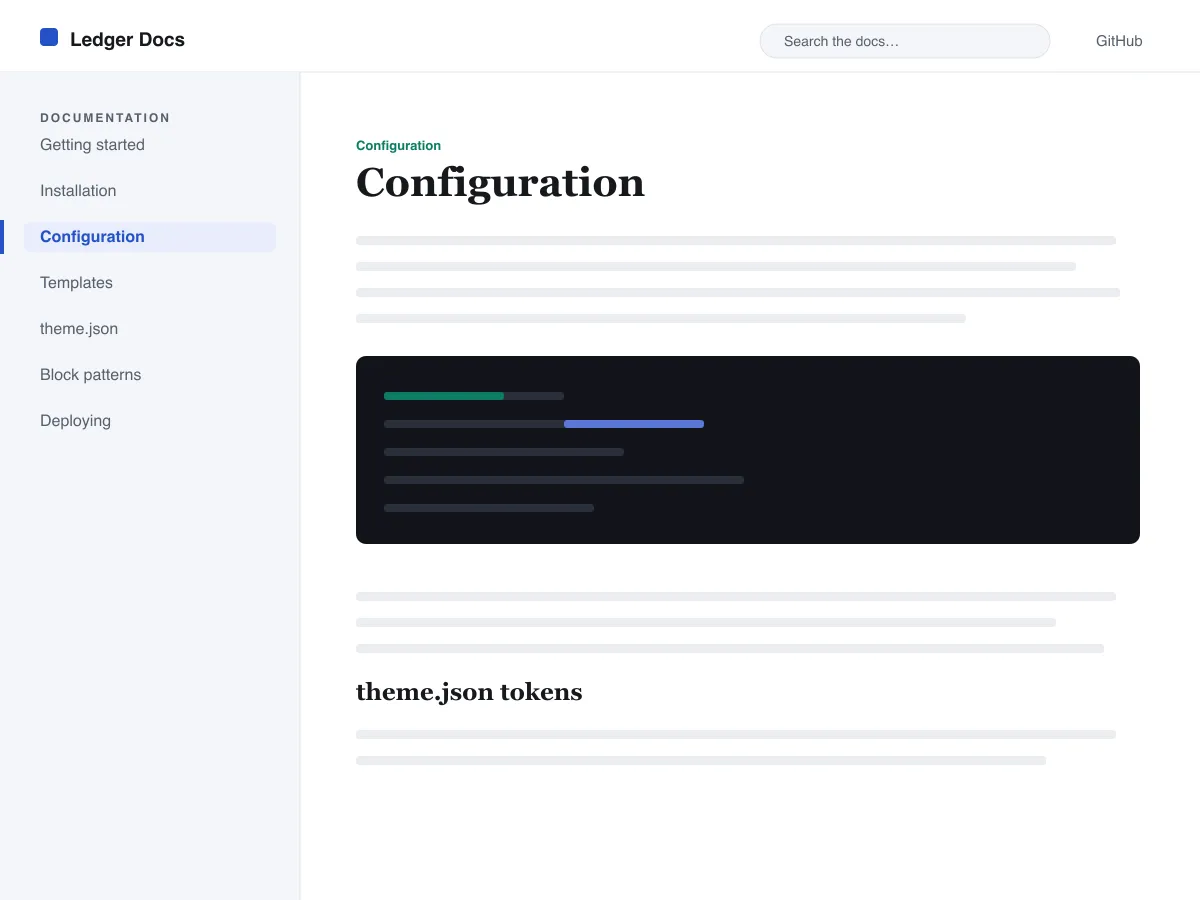
What Ledger Docs is for
Ledger Docs is a block theme for documentation: plugin and theme manuals, open-source project docs, internal handbooks. Each template puts a vertical Navigation block in a left-hand column that stays in view as the reader scrolls on screens wider than 782px, with the content beside it.
Code is treated as content, not decoration. The Code and Preformatted blocks get a border, padding and a monospace system font from theme.json, and inline code is styled to stay legible inside a sentence. A search field sits in the header on every page and on the 404 page.
It uses system fonts, makes no third-party requests, and ships five templates (index, single, page, archive, 404) and two template parts. There is one light colour palette; colours can be changed in Styles.
Who it suits
Plugin authors, open-source maintainers and teams who want a WordPress site that reads like a manual — sidebar tree, search, code samples — without a docs plugin or a page builder.
Ledger Docs में क्या है
- मानक Navigation ब्लॉक से बनी स्टिकी बाईं ओर की डॉक्यूमेंटेशन साइडबार, ताकि लेखक बिना कोड के एडिटर से ही डॉक्स ट्री को प्रबंधित करें।
- बेहतरीन कोड प्रस्तुति: बॉर्डर वाले, मोनोस्पेस्ड core/code और core/preformatted ब्लॉक साथ ही स्टाइल किया गया इनलाइन कोड, सब theme.json द्वारा संचालित।
- clamp() के ज़रिए फ़्लूइड सिस्टम-फ़ॉन्ट टाइपोग्राफी, एक ट्यून किए गए टाइप स्केल, उदार line-height और बिना किसी बाहरी या बंडल किए फ़ॉन्ट फ़ाइल के।
- A restrained light palette (white base, near-black text, one blue primary) with two duotone filters; every text colour measures above WCAG AA contrast on the base and surface colours.
- एक्सेसिबिलिटी-रेडी: स्किप लिंक, दिखाई देने वाला कीबोर्ड फ़ोकस, सिमेंटिक header/main/footer लैंडमार्क और prefers-reduced-motion सपोर्ट।
- हेडर में एक स्थायी सर्च फ़ील्ड और डॉक्यूमेंटेशन ब्राउज़ करने के लिए साफ़-सुथरी क्वेरी-लूप लिस्टिंग के साथ सर्च-फ्रेंडली आर्काइव।
Ledger Docs at a glance
- Theme type
- Block theme (edited in the Site Editor)
- Current version
- 1.0.0
- First published
- 14 जुलाई 2026
- Requires WordPress
- 6.5
- Tested up to WordPress
- 6.7
- Requires PHP
- 7.4
Requirements come from the theme's own style.css. Checked on 28 अक्टूबर 2026.
Good to know before you install
- This theme is downloaded from this site, not from the WordPress.org directory, so WordPress will not show an update notice for it. Check this page for new versions.
- There is no dark mode and no bundled style variation.
- Code blocks are styled but not syntax-highlighted; use a highlighting plugin if you need colours.
- The sidebar and header Navigation blocks ship without a menu assigned, so WordPress shows its fallback menu in both until you pick one.
अगले कदम
अपनी site सेट करने के लिए मुफ़्त tools
WordPress theme.json जेनरेटर
एक वैध theme.json बनाएं — और देखें कि इसका कौन-सा हिस्सा असल में आपकी साइट बदलता है।
Tool खोलेंWordPress इमेज साइज़ लैब
एक इमेज डालें। देखें WordPress इसकी हर कॉपी जो बनाएगा।
Tool खोलेंWordPress .htaccess जनरेटर
वे नियम जो WordPress को चाहिए, साथ ही वे सुरक्षा नियम जो इसके साथ डिफ़ॉल्ट रूप से नहीं आते
Tool खोलेंमिलते-जुलते
दूसरे themes जो आपको पसंद आ सकते हैं
सामान्य प्रश्न
Ledger Docs से जुड़े सवाल
What does Ledger Docs need to run?
WordPress 6.5 or later and PHP 7.4 or later, according to its style.css, which also says it was tested up to WordPress 6.7. The current version is 1.0.0.
Does Ledger Docs highlight code syntax?
No. It styles the Code and Preformatted blocks (border, padding, monospace font) and inline code, but colouring code by language is plugin territory. Its blocks are built to sit well next to any highlighter.
How do I give the docs sidebar its own menu?
Open Appearance → Editor → Templates, edit a template such as Single, select the Navigation block in the left column and choose or create a menu in its settings. Do the same in the Page, Index and Archive templates. Until you do, WordPress fills every Navigation block, including the header one, with the same fallback menu.
Does Ledger Docs have a dark mode?
No. It ships one light palette with a near-black text colour and a blue primary. You can change any colour under Appearance → Editor → Styles.
Can I remove the Ledger Docs footer credit?
Yes. Edit the Footer template part in Appearance → Editor → Patterns, delete the “Theme by Odie Themes” paragraph and save. Nothing depends on it.