Ledger DocsTema WordPress per Documentazione
Un tema per la documentazione, calmo e veloce, per chi scrive documentazione, non pagine di marketing.
What Ledger Docs is for
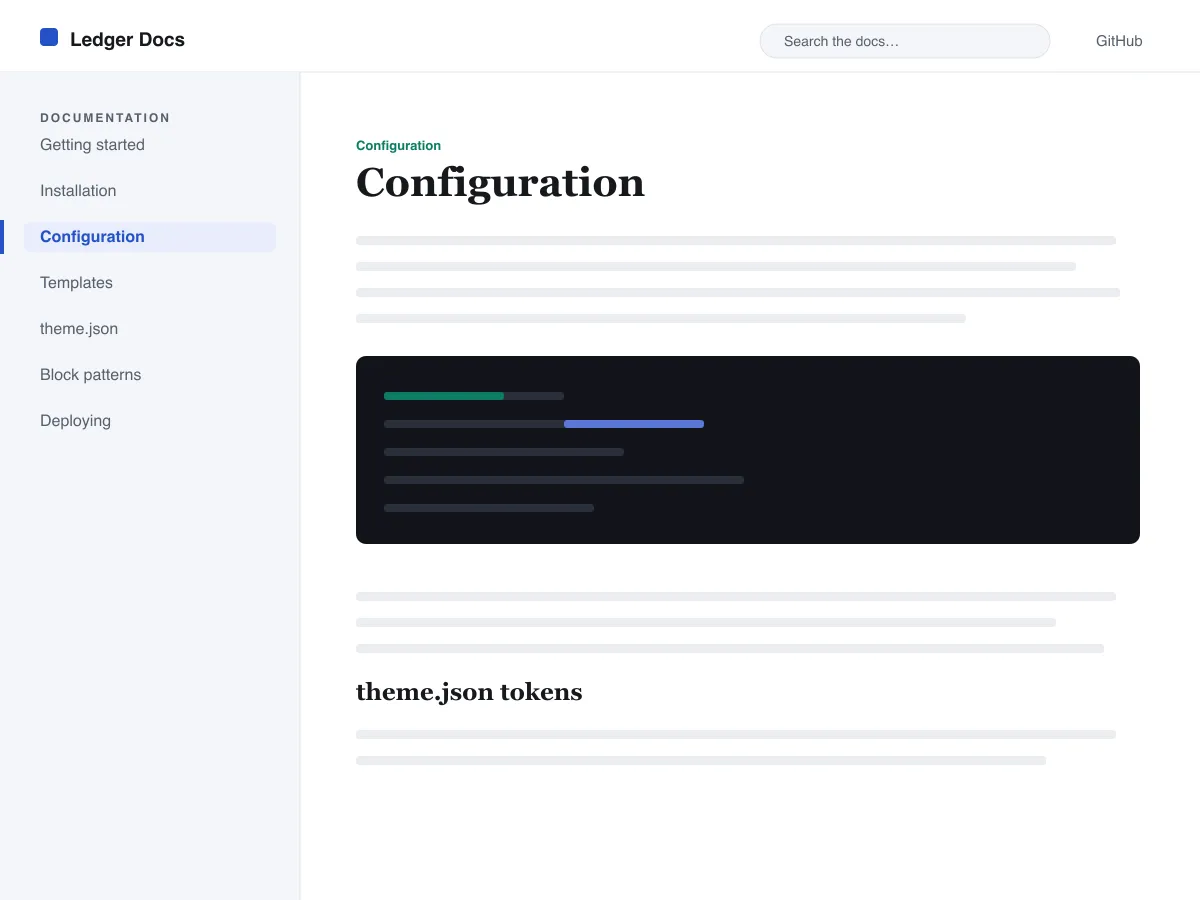
Ledger Docs is a block theme for documentation: plugin and theme manuals, open-source project docs, internal handbooks. Each template puts a vertical Navigation block in a left-hand column that stays in view as the reader scrolls on screens wider than 782px, with the content beside it.
Code is treated as content, not decoration. The Code and Preformatted blocks get a border, padding and a monospace system font from theme.json, and inline code is styled to stay legible inside a sentence. A search field sits in the header on every page and on the 404 page.
It uses system fonts, makes no third-party requests, and ships five templates (index, single, page, archive, 404) and two template parts. There is one light colour palette; colours can be changed in Styles.
Who it suits
Plugin authors, open-source maintainers and teams who want a WordPress site that reads like a manual — sidebar tree, search, code samples — without a docs plugin or a page builder.
Cosa c'è in Ledger Docs
- Barra laterale della documentazione fissa a sinistra, costruita con un normale blocco Navigazione, così gli autori gestiscono la struttura della documentazione dall'editor senza scrivere codice.
- Presentazione del codice di prim'ordine: blocchi core/code e core/preformatted con bordo e carattere monospazio, oltre a codice inline con stile, tutto gestito da theme.json.
- Tipografia fluida con font di sistema tramite clamp(), con una scala tipografica calibrata, interlinea generosa e nessun file di font esterno o incluso.
- A restrained light palette (white base, near-black text, one blue primary) with two duotone filters; every text colour measures above WCAG AA contrast on the base and surface colours.
- Pronto per l'accessibilità: skip link, focus da tastiera visibile, landmark semantici header/main/footer e supporto per prefers-reduced-motion.
- Archivi ottimizzati per la ricerca con un campo di ricerca sempre presente nell'header ed elenchi query-loop puliti per sfogliare la documentazione.
Ledger Docs at a glance
- Theme type
- Block theme (edited in the Site Editor)
- Current version
- 1.0.0
- First published
- 14 luglio 2026
- Requires WordPress
- 6.5
- Tested up to WordPress
- 6.7
- Requires PHP
- 7.4
Requirements come from the theme's own style.css. Checked on 28 ottobre 2026.
Good to know before you install
- This theme is downloaded from this site, not from the WordPress.org directory, so WordPress will not show an update notice for it. Check this page for new versions.
- There is no dark mode and no bundled style variation.
- Code blocks are styled but not syntax-highlighted; use a highlighting plugin if you need colours.
- The sidebar and header Navigation blocks ship without a menu assigned, so WordPress shows its fallback menu in both until you pick one.
Prossimi passi
Strumenti gratis per configurare il tuo sito
Generatore di theme.json per WordPress
Crea un theme.json valido — e scopri quale metà cambia davvero il tuo sito.
Apri lo strumentoLaboratorio delle dimensioni immagine di WordPress
Trascina dentro un'immagine. Guarda ogni copia che WordPress ne farà.
Apri lo strumentoGeneratore di .htaccess per WordPress
Le regole di cui WordPress ha bisogno, più le regole di hardening che non include di serie
Apri lo strumentoCorrelati
Altri temi che potrebbero piacerti
FAQ
Domande su Ledger Docs
What does Ledger Docs need to run?
WordPress 6.5 or later and PHP 7.4 or later, according to its style.css, which also says it was tested up to WordPress 6.7. The current version is 1.0.0.
Does Ledger Docs highlight code syntax?
No. It styles the Code and Preformatted blocks (border, padding, monospace font) and inline code, but colouring code by language is plugin territory. Its blocks are built to sit well next to any highlighter.
How do I give the docs sidebar its own menu?
Open Appearance → Editor → Templates, edit a template such as Single, select the Navigation block in the left column and choose or create a menu in its settings. Do the same in the Page, Index and Archive templates. Until you do, WordPress fills every Navigation block, including the header one, with the same fallback menu.
Does Ledger Docs have a dark mode?
No. It ships one light palette with a near-black text colour and a blue primary. You can change any colour under Appearance → Editor → Styles.
Can I remove the Ledger Docs footer credit?
Yes. Edit the Footer template part in Appearance → Editor → Patterns, delete the “Theme by Odie Themes” paragraph and save. Nothing depends on it.