Ledger DocsWordPress ڈاکیومنٹیشن تھیم
ان لوگوں کے لیے ایک پُرسکون، تیز رفتار دستاویزی تھیم جو ڈاکس لکھتے ہیں، مارکیٹنگ صفحات نہیں۔
What Ledger Docs is for
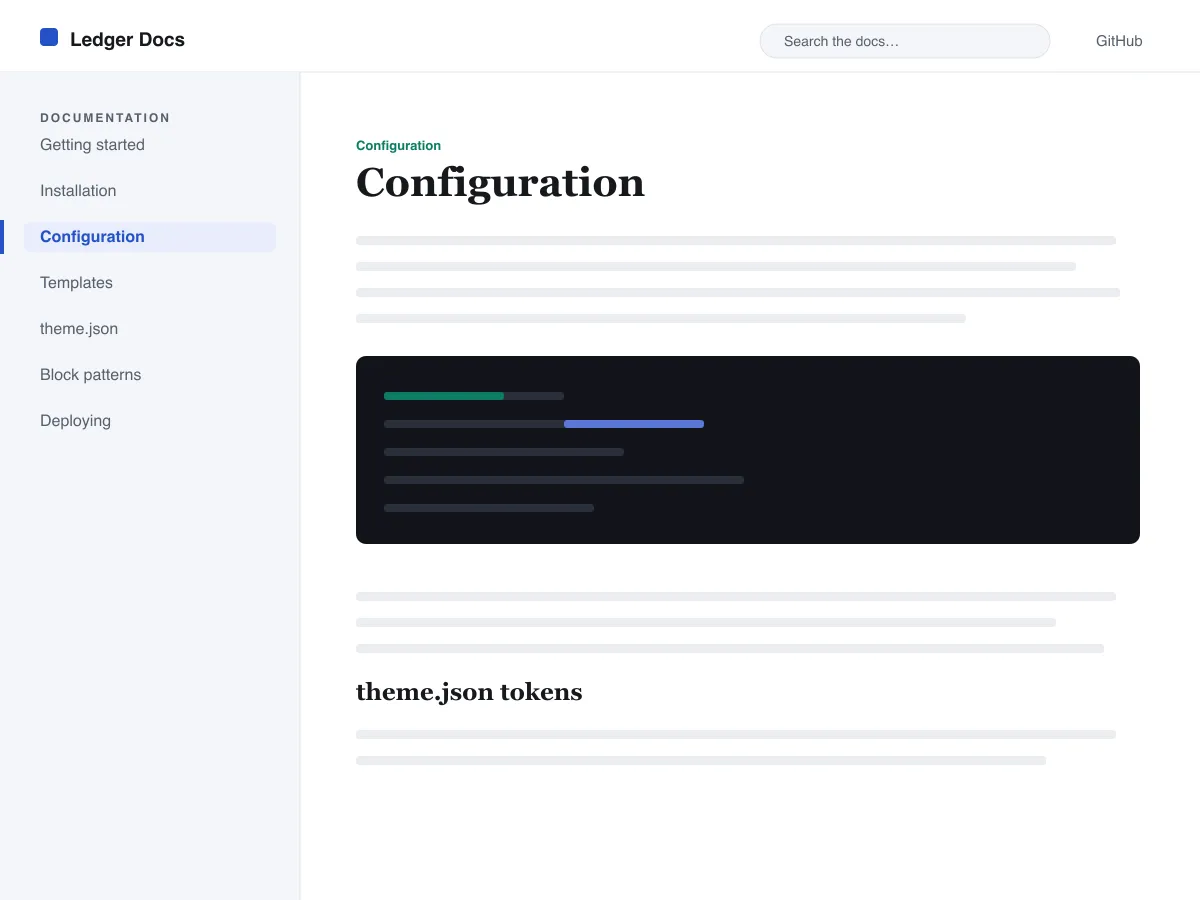
Ledger Docs is a block theme for documentation: plugin and theme manuals, open-source project docs, internal handbooks. Each template puts a vertical Navigation block in a left-hand column that stays in view as the reader scrolls on screens wider than 782px, with the content beside it.
Code is treated as content, not decoration. The Code and Preformatted blocks get a border, padding and a monospace system font from theme.json, and inline code is styled to stay legible inside a sentence. A search field sits in the header on every page and on the 404 page.
It uses system fonts, makes no third-party requests, and ships five templates (index, single, page, archive, 404) and two template parts. There is one light colour palette; colours can be changed in Styles.
Who it suits
Plugin authors, open-source maintainers and teams who want a WordPress site that reads like a manual — sidebar tree, search, code samples — without a docs plugin or a page builder.
Ledger Docs میں کیا ہے
- ایک معیاری Navigation بلاک سے بنایا گیا چپکنے والا (sticky) بائیں جانب کا دستاویزی سائیڈبار، تاکہ مصنفین بغیر کوڈ کے ایڈیٹر ہی سے ڈاکس ٹری کا انتظام کریں۔
- اعلیٰ درجے کی کوڈ پیشکش: بارڈر والے، monospaced core/code اور core/preformatted بلاکس نیز اسٹائل شدہ inline کوڈ، سب کچھ theme.json سے چلتا ہے۔
- clamp() کے ذریعے سیال سسٹم فونٹ ٹائپوگرافی، ایک مہذب ٹائپ اسکیل، کھلی line-height کے ساتھ، اور کوئی بیرونی یا ساتھ شامل فونٹ فائلیں نہیں۔
- A restrained light palette (white base, near-black text, one blue primary) with two duotone filters; every text colour measures above WCAG AA contrast on the base and surface colours.
- رسائی کے لیے تیار: skip link، نظر آنے والا کی بورڈ focus، معنوی header/main/footer landmarks، اور prefers-reduced-motion سپورٹ۔
- تلاش کے موافق آرکائیوز، ہیڈر میں ایک مستقل تلاش فیلڈ اور دستاویزات دیکھنے کے لیے صاف ستھری query-loop فہرستوں کے ساتھ۔
Ledger Docs at a glance
- Theme type
- Block theme (edited in the Site Editor)
- Current version
- 1.0.0
- First published
- 14 جولائی، 2026
- Requires WordPress
- 6.5
- Tested up to WordPress
- 6.7
- Requires PHP
- 7.4
Requirements come from the theme's own style.css. Checked on 28 اکتوبر، 2026.
Good to know before you install
- This theme is downloaded from this site, not from the WordPress.org directory, so WordPress will not show an update notice for it. Check this page for new versions.
- There is no dark mode and no bundled style variation.
- Code blocks are styled but not syntax-highlighted; use a highlighting plugin if you need colours.
- The sidebar and header Navigation blocks ship without a menu assigned, so WordPress shows its fallback menu in both until you pick one.
اگلے مراحل
اپنی سائٹ سیٹ اپ کرنے کے لیے مفت ٹولز
WordPress theme.json جنریٹر
ایک درست theme.json بنائیں — اور دیکھیں کہ اس کا کون سا حصہ واقعی آپ کی سائٹ بدلتا ہے۔
ٹول کھولیںWordPress امیج سائز لیب
ایک امیج ڈالیں۔ دیکھیں کہ WordPress اس کی کون کون سی کاپیاں بنائے گا۔
ٹول کھولیںWordPress .htaccess جنریٹر
وہ رولز جو WordPress کو درکار ہیں، اور ساتھ وہ سیکیورٹی ہارڈننگ رولز جو یہ ازخود فراہم نہیں کرتا
ٹول کھولیںمتعلقہ
دیگر themes جو آپ کو پسند آ سکتے ہیں
عمومی سوالات
Ledger Docs کے سوالات
What does Ledger Docs need to run?
WordPress 6.5 or later and PHP 7.4 or later, according to its style.css, which also says it was tested up to WordPress 6.7. The current version is 1.0.0.
Does Ledger Docs highlight code syntax?
No. It styles the Code and Preformatted blocks (border, padding, monospace font) and inline code, but colouring code by language is plugin territory. Its blocks are built to sit well next to any highlighter.
How do I give the docs sidebar its own menu?
Open Appearance → Editor → Templates, edit a template such as Single, select the Navigation block in the left column and choose or create a menu in its settings. Do the same in the Page, Index and Archive templates. Until you do, WordPress fills every Navigation block, including the header one, with the same fallback menu.
Does Ledger Docs have a dark mode?
No. It ships one light palette with a near-black text colour and a blue primary. You can change any colour under Appearance → Editor → Styles.
Can I remove the Ledger Docs footer credit?
Yes. Edit the Footer template part in Appearance → Editor → Patterns, delete the “Theme by Odie Themes” paragraph and save. Nothing depends on it.