Ledger Docsقالب مستندات WordPress
پوستهای آرام و سریع برای مستندنویسی، مناسب کسانی که مستندات مینویسند، نه صفحات بازاریابی.
What Ledger Docs is for
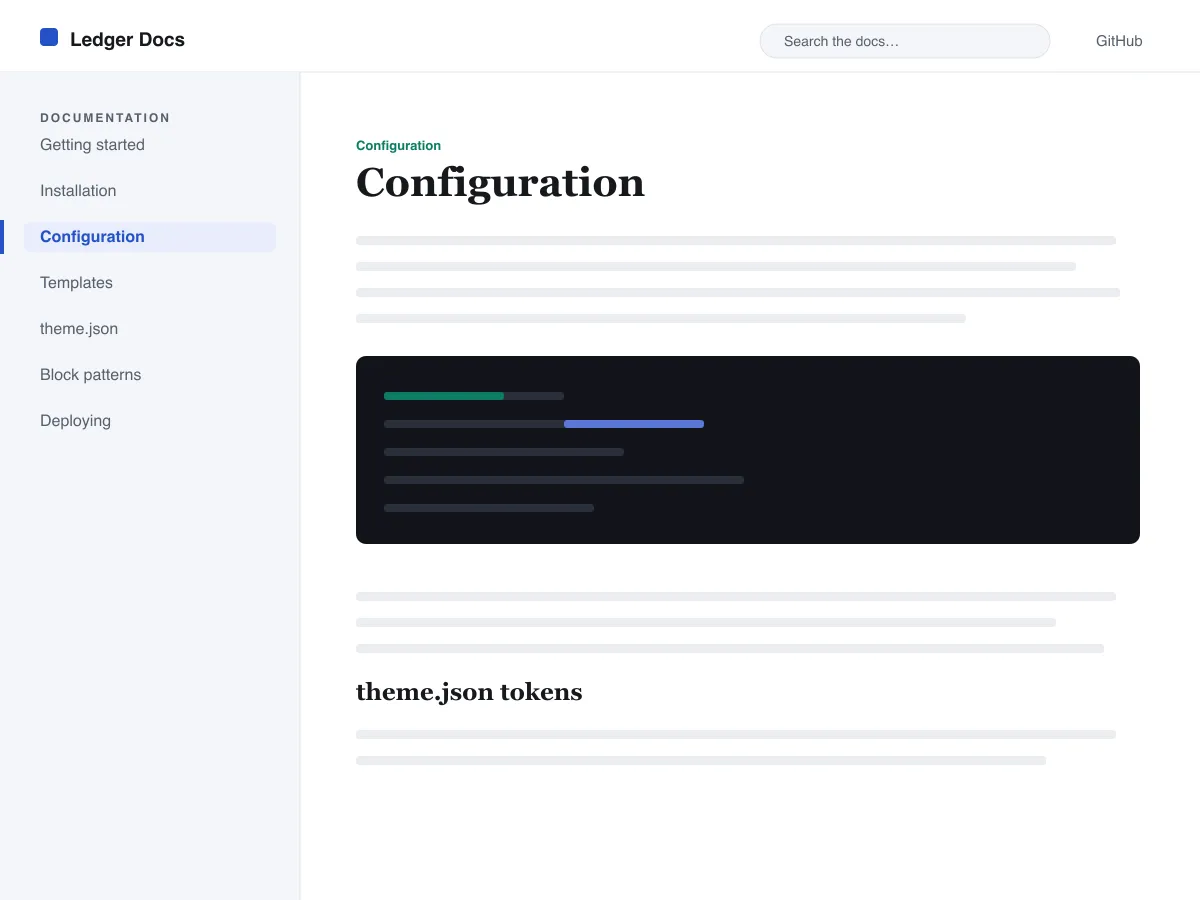
Ledger Docs is a block theme for documentation: plugin and theme manuals, open-source project docs, internal handbooks. Each template puts a vertical Navigation block in a left-hand column that stays in view as the reader scrolls on screens wider than 782px, with the content beside it.
Code is treated as content, not decoration. The Code and Preformatted blocks get a border, padding and a monospace system font from theme.json, and inline code is styled to stay legible inside a sentence. A search field sits in the header on every page and on the 404 page.
It uses system fonts, makes no third-party requests, and ships five templates (index, single, page, archive, 404) and two template parts. There is one light colour palette; colours can be changed in Styles.
Who it suits
Plugin authors, open-source maintainers and teams who want a WordPress site that reads like a manual — sidebar tree, search, code samples — without a docs plugin or a page builder.
چه چیزهایی در Ledger Docs هست
- نوار کناری چسبانِ مستندات در سمت چپ که از یک بلوک ناوبری استاندارد ساخته شده، تا نویسندگان درخت مستندات را بدون کدنویسی از داخل ویرایشگر مدیریت کنند.
- نمایش درجهیک کد: بلوکهای core/code و core/preformatted با کادر و فونت تکفاصله، بههمراه کدِ درونخطیِ استایلدار، همه از طریق theme.json کنترل میشوند.
- تایپوگرافی سیال با فونت سیستمی به کمک clamp()، همراه با مقیاسِ فونتِ تنظیمشده، ارتفاع خطِ سخاوتمندانه و بدون هیچ فایل فونت بیرونی یا همراهشده.
- A restrained light palette (white base, near-black text, one blue primary) with two duotone filters; every text colour measures above WCAG AA contrast on the base and surface colours.
- آمادهٔ دسترسپذیری: پیوند پرش (skip link)، فوکوسِ نمایانِ صفحهکلید، نشانههای معناییِ header/main/footer و پشتیبانی از prefers-reduced-motion.
- آرشیوهای جستجوپذیر با یک فیلد جستجوی همیشگی در سربرگ و فهرستهای تمیزِ حلقهٔ پرسوجو (query loop) برای مرور مستندات.
Ledger Docs at a glance
- Theme type
- Block theme (edited in the Site Editor)
- Current version
- 1.0.0
- First published
- ۲۳ تیر ۱۴۰۵
- Requires WordPress
- 6.5
- Tested up to WordPress
- 6.7
- Requires PHP
- 7.4
Requirements come from the theme's own style.css. Checked on ۶ آبان ۱۴۰۵.
Good to know before you install
- This theme is downloaded from this site, not from the WordPress.org directory, so WordPress will not show an update notice for it. Check this page for new versions.
- There is no dark mode and no bundled style variation.
- Code blocks are styled but not syntax-highlighted; use a highlighting plugin if you need colours.
- The sidebar and header Navigation blocks ship without a menu assigned, so WordPress shows its fallback menu in both until you pick one.
گامهای بعدی
ابزارهای رایگان برای راهاندازی سایت شما
سازنده theme.json برای WordPress
یک theme.json معتبر بسازید — و ببینید کدام نیمه واقعاً سایت شما را تغییر میدهد.
باز کردن ابزارآزمایشگاه اندازهٔ تصویر وردپرس
یک تصویر را رها کنید. همهٔ نسخههایی را که وردپرس از آن میسازد ببینید.
باز کردن ابزارسازندهٔ .htaccess وردپرس
قواعدی که وردپرس به آنها نیاز دارد، بهعلاوهٔ قواعد امنسازی که بهصورت پیشفرض همراهش نمیآیند
باز کردن ابزارمرتبط
قالبهای دیگری که ممکن است بپسندید
پرسشهای متداول
پرسشهای Ledger Docs
What does Ledger Docs need to run?
WordPress 6.5 or later and PHP 7.4 or later, according to its style.css, which also says it was tested up to WordPress 6.7. The current version is 1.0.0.
Does Ledger Docs highlight code syntax?
No. It styles the Code and Preformatted blocks (border, padding, monospace font) and inline code, but colouring code by language is plugin territory. Its blocks are built to sit well next to any highlighter.
How do I give the docs sidebar its own menu?
Open Appearance → Editor → Templates, edit a template such as Single, select the Navigation block in the left column and choose or create a menu in its settings. Do the same in the Page, Index and Archive templates. Until you do, WordPress fills every Navigation block, including the header one, with the same fallback menu.
Does Ledger Docs have a dark mode?
No. It ships one light palette with a near-black text colour and a blue primary. You can change any colour under Appearance → Editor → Styles.
Can I remove the Ledger Docs footer credit?
Yes. Edit the Footer template part in Appearance → Editor → Patterns, delete the “Theme by Odie Themes” paragraph and save. Nothing depends on it.