Ledger DocsТема WordPress для документації
Спокійна та швидка тема для документації — для тих, хто пише документацію, а не маркетингові сторінки.
What Ledger Docs is for
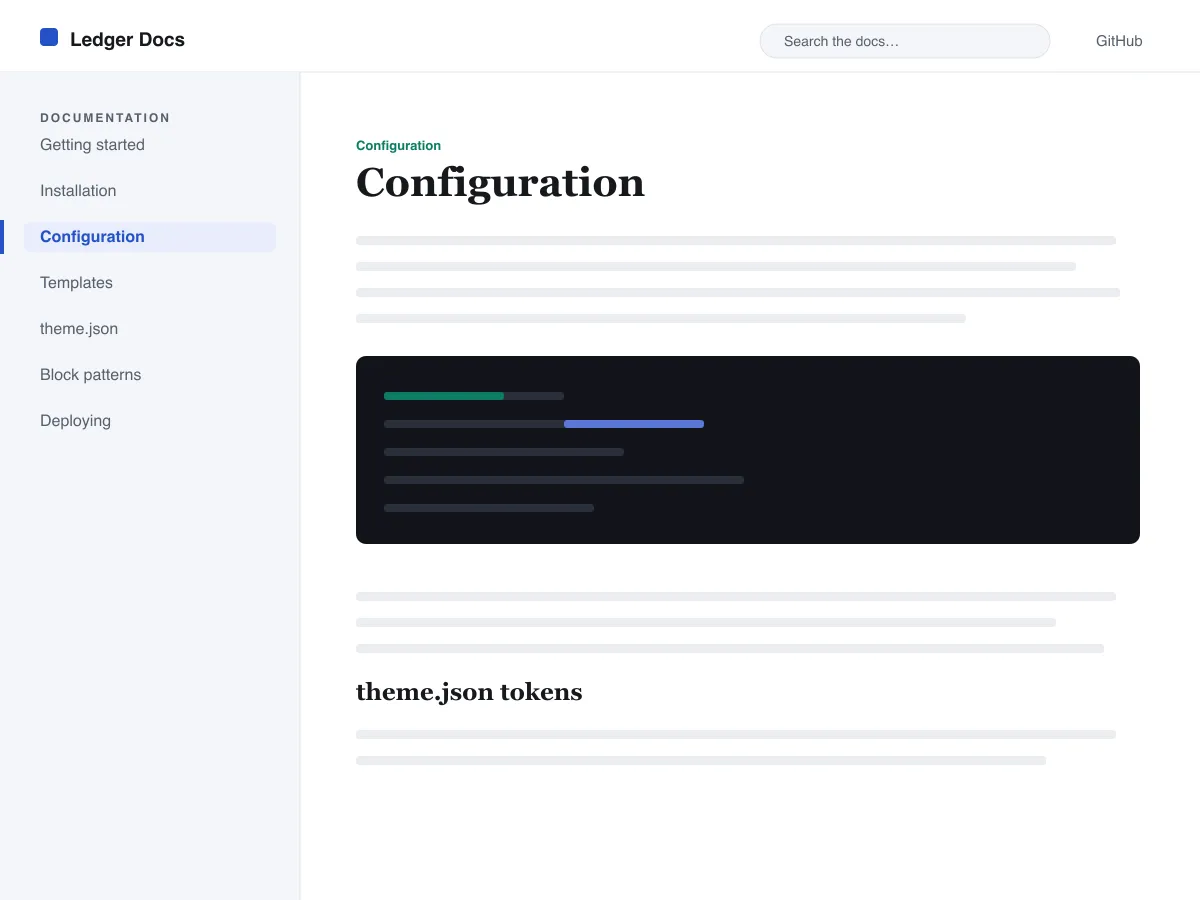
Ledger Docs is a block theme for documentation: plugin and theme manuals, open-source project docs, internal handbooks. Each template puts a vertical Navigation block in a left-hand column that stays in view as the reader scrolls on screens wider than 782px, with the content beside it.
Code is treated as content, not decoration. The Code and Preformatted blocks get a border, padding and a monospace system font from theme.json, and inline code is styled to stay legible inside a sentence. A search field sits in the header on every page and on the 404 page.
It uses system fonts, makes no third-party requests, and ships five templates (index, single, page, archive, 404) and two template parts. There is one light colour palette; colours can be changed in Styles.
Who it suits
Plugin authors, open-source maintainers and teams who want a WordPress site that reads like a manual — sidebar tree, search, code samples — without a docs plugin or a page builder.
Що є в Ledger Docs
- Липка ліва бічна панель документації, побудована на стандартному блоці «Навігація», тож автори керують деревом документації прямо з редактора без жодного коду.
- Першокласне подання коду: обрамлені моноширинні блоки core/code та core/preformatted, а також стилізований вбудований код — усе керується через theme.json.
- Плавна типографіка на системних шрифтах через clamp() з відлагодженою типографічною шкалою, щедрим міжрядковим інтервалом і без зовнішніх чи вбудованих файлів шрифтів.
- A restrained light palette (white base, near-black text, one blue primary) with two duotone filters; every text colour measures above WCAG AA contrast on the base and surface colours.
- Готовність до доступності: посилання для пропуску до вмісту, видима фокусна рамка при керуванні з клавіатури, семантичні орієнтири header/main/footer і підтримка prefers-reduced-motion.
- Зручні для пошуку архіви з постійним полем пошуку в шапці та охайними списками на основі циклу запитів для перегляду документації.
Ledger Docs at a glance
- Theme type
- Block theme (edited in the Site Editor)
- Current version
- 1.0.0
- First published
- 14 липня 2026 р.
- Requires WordPress
- 6.5
- Tested up to WordPress
- 6.7
- Requires PHP
- 7.4
Requirements come from the theme's own style.css. Checked on 28 жовтня 2026 р..
Good to know before you install
- This theme is downloaded from this site, not from the WordPress.org directory, so WordPress will not show an update notice for it. Check this page for new versions.
- There is no dark mode and no bundled style variation.
- Code blocks are styled but not syntax-highlighted; use a highlighting plugin if you need colours.
- The sidebar and header Navigation blocks ship without a menu assigned, so WordPress shows its fallback menu in both until you pick one.
Наступні кроки
Безкоштовні інструменти для налаштування сайту
Генератор theme.json для WordPress
Створіть валідний theme.json — і побачте, яка його половина справді змінює сайт.
Відкрити інструментЛабораторія розмірів зображень WordPress
Перетягніть зображення. Побачте кожну копію, яку WordPress з нього зробить.
Відкрити інструментГенератор .htaccess для WordPress
Правила, потрібні WordPress, плюс правила захисту, яких немає з коробки
Відкрити інструментСхоже
Інші шаблони, які можуть вам сподобатися
Часті запитання
Питання про Ledger Docs
What does Ledger Docs need to run?
WordPress 6.5 or later and PHP 7.4 or later, according to its style.css, which also says it was tested up to WordPress 6.7. The current version is 1.0.0.
Does Ledger Docs highlight code syntax?
No. It styles the Code and Preformatted blocks (border, padding, monospace font) and inline code, but colouring code by language is plugin territory. Its blocks are built to sit well next to any highlighter.
How do I give the docs sidebar its own menu?
Open Appearance → Editor → Templates, edit a template such as Single, select the Navigation block in the left column and choose or create a menu in its settings. Do the same in the Page, Index and Archive templates. Until you do, WordPress fills every Navigation block, including the header one, with the same fallback menu.
Does Ledger Docs have a dark mode?
No. It ships one light palette with a near-black text colour and a blue primary. You can change any colour under Appearance → Editor → Styles.
Can I remove the Ledger Docs footer credit?
Yes. Edit the Footer template part in Appearance → Editor → Patterns, delete the “Theme by Odie Themes” paragraph and save. Nothing depends on it.